
If you are migrating a data center from 100G to 25G aggregation, the breakout transceiver 100G 25G approach can reduce optics churn while preserving throughput. This guide is written for field engineers and network operators who must validate switch/optics compatibility, fiber polarity, and operational limits before cutting over. You will get an implementation workflow, a specs-focused comparison table, and practical troubleshooting rooted in typical failure modes. Update date: 2026-04-29.
Prerequisites and safety checks before you touch optics
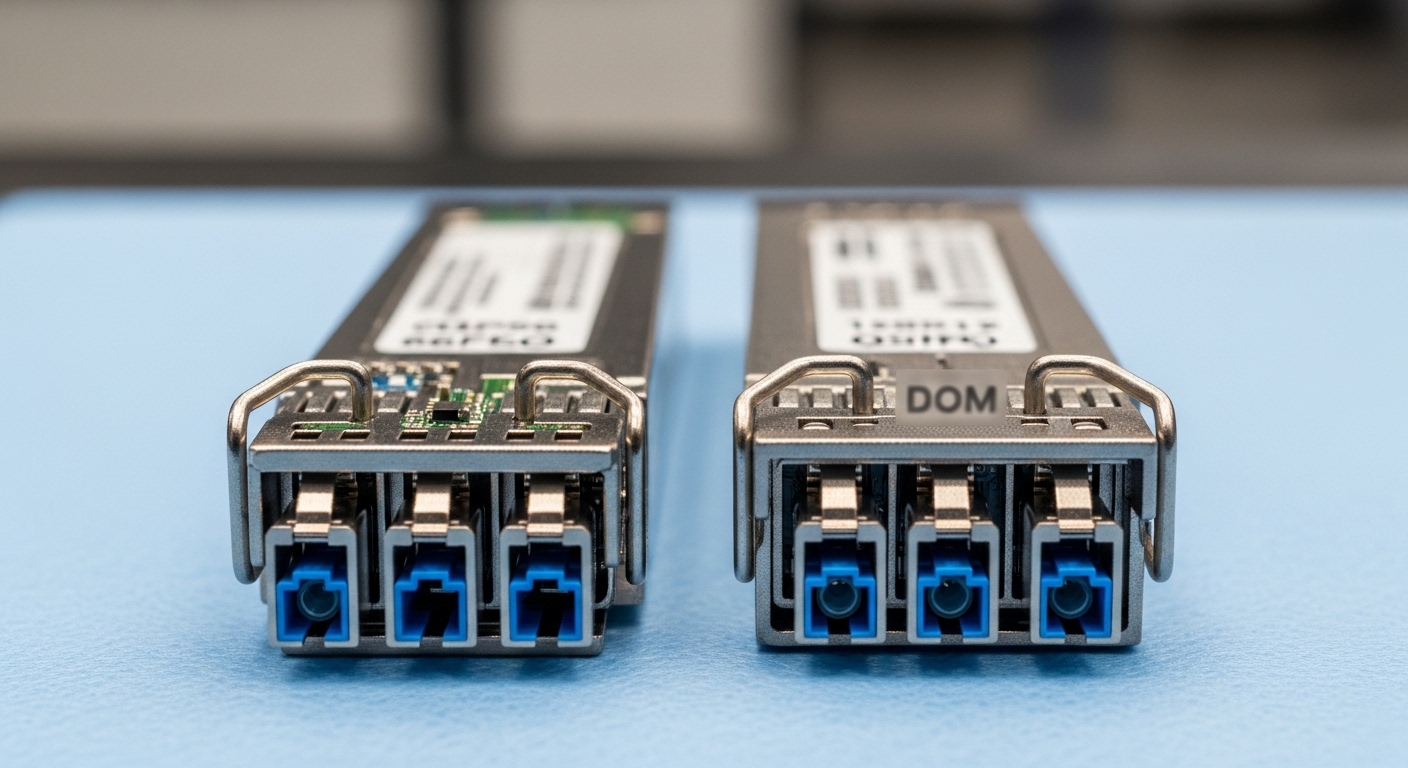
Before installing any breakout optics, confirm that the target switch ports support breakout mode and that the transceiver vendor is rated for your exact temperature class and DOM behavior. Most 100G-to-4x25G breakouts follow IEEE 802.3 media conventions for lane mapping, but vendor implementations differ in how they expose alarms and diagnostics. Also plan for fiber polarity handling: 25G SR links commonly use MPO/MTP cassettes with strict polarity rules, so a single reversed cassette can cause silent BER degradation or full link failure. Finally, follow electrostatic discharge (ESD) and laser safety procedures per your site policy and the transceiver datasheet.
Hardware and documentation you should have
- Switch models and firmware versions for both ends (e.g., spine/leaf ToR and aggregation switches).
- Optics part numbers you intend to deploy (examples: Cisco SFP-10G-SR is not relevant; for 100G breakout, look for 100G QSFP28-to-4x25G breakout modules or equivalent cable assemblies).
- Fiber plant documentation: MPO/MTP cassette type, polarity method (Type A/B), and patch panel mapping.
- DOM tooling: switch CLI access for optical diagnostics and alarm thresholds.
- ESD protection and a clean work surface; alcohol wipes and lint-free swabs for ferrule cleaning.
Operational readiness targets
Set acceptance criteria before the first patch. For example, require that the link negotiates at the intended speed, that optical power is within vendor specified receive sensitivity margins, and that interface counters show no abnormal CRC or FEC events. If your switch supports pre-FEC counters, capture baseline values after bringing the link up. For any planned production cutover, schedule a maintenance window that accounts for troubleshooting time if polarity or lane mapping is wrong.
- Expected outcome: You have validated that the environment is ready for breakout mode, with documentation and tools matching the exact optics and fiber polarity plan.
[[IMAGE:Close-up macro photography in a clean data center aisle: a technician wearing ESD strap inserts a 100G QSFP28 breakout transceiver into a switch port, with a labeled MPO/MTP cassette and fiber patch cords visible; shallow depth of field, cool LED overhead lighting, photorealistic style, high detail on connector latches and dust caps.]
Step-by-step implementation workflow: breakout transceiver 100G 25G
This section provides a numbered deployment workflow that you can follow during migration. The goal is to ensure the breakout transceiver 100G 25G is detected, mapped to the correct 25G lanes, and verified through link and optics diagnostics. You will also build a rollback plan so that if the first port fails, you can recover without extended downtime. Where commands vary by vendor, the validation logic remains the same: confirm breakout enablement, validate interface state, and check optical thresholds.
Confirm breakout capability and lane mapping in switch firmware
On many platforms, breakout mode is enabled per physical port and may require a specific optics profile. Verify that the target port supports 100G-to-4x25G breakout and that your firmware version includes support for the transceiver type. In practice, engineers often discover that a switch will accept the transceiver but not enable breakout until you set the port mode explicitly. Also determine whether the switch expects a particular lane mapping order; some platforms provide a “lane” or “breakout” mapping view in the CLI.
- Expected outcome: The switch recognizes the port as capable of 4x25G breakout and exposes the four 25G logical interfaces.
Verify optics compatibility, DOM behavior, and temperature class
Breakout optics are not interchangeable across vendors even when they advertise the same nominal data rate and reach. Check the transceiver datasheet for wavelength, reach, and connector type, and confirm it is rated for your temperature range (for example, 0 to 70 C or an extended class). If your platform relies on DOM for monitoring and alarm forwarding, ensure the module supports the required diagnostic interface. Vendor datasheets and switch compatibility matrices matter here; an optics that is “electrically compatible” may still fail in DOM polling or alarm reporting.
| Parameter | Typical breakout transceiver 100G 25G (SR-style) | What to verify in your BOM |
|---|---|---|
| Data rate | 100G aggregate → 4 x 25G | Confirm breakout ratio and whether 25G interfaces are independent logical ports |
| Optical type | MMF SR (short reach) | Confirm MMF type and whether it is 850 nm class |
| Wavelength | ~850 nm class for SR | Validate exact nominal wavelength band and any vendor tolerances |
| Reach (typical) | ~70 m to 100 m (varies by OM3/OM4 and link budget) | Match OM3 vs OM4 requirements and vendor-defined link budget |
| Connector | MPO/MTP (often 12-fiber) with polarity constraints | Verify cassette type and polarity method (Type A vs Type B) |
| DOM | Usually supported for monitoring | Confirm DOM commands and alarm thresholds your switch expects |
| Operating temperature | Often 0 to 70 C or extended | Ensure compliance with your rack inlet temperature and airflow conditions |
| Standards alignment | Ethernet 100G/25G lane conventions | IEEE 802.3 media guidance and vendor implementation notes |
Authority note: breakout behavior is grounded in Ethernet PHY lane conventions and media definitions; consult IEEE 802.3 for baseline media and interface expectations. [Source: IEEE 802.3] For practical compatibility, rely on your switch vendor’s optics compatibility guide and transceiver datasheets.
- Expected outcome: You have confirmed the module’s optical parameters, connector/polarity expectations, DOM support, and temperature class match the site and switch.
[[IMAGE:Vector illustration with a clean technical diagram style: a four-lane breakout schematic showing a single 100G QSFP28-style transceiver feeding four 25G lanes, with labeled MPO/MTP polarity arrows and lane mapping blocks; white background, blue and orange lines, crisp typography-like labels, flat design.]
Clean and inspect fiber, then patch with correct polarity
Breakout links are extremely sensitive to MPO/MTP polarity. Before insertion, inspect both the transceiver ferrules and the MPO/MTP end faces under magnification for dust and scratches. Clean using approved methods; avoid generic wipes that can leave residue. Then patch according to the polarity method required by your breakout optics and the fiber plant design. In many deployments, engineers use pre-validated polarity cassettes labeled on both ends; do not rely on “it worked last time” because swapping cassette type can invert lane mapping.
- Expected outcome: The patched fibers follow the documented polarity scheme for the breakout transceiver 100G 25G link.
Insert optics, enable breakout mode, and verify link state
Insert the transceiver gently until the latch clicks. Then enable breakout mode on the physical port if your platform requires it. Validate that the four 25G logical interfaces come up, not just the parent 100G interface. After link-up, check interface counters and optical diagnostics such as received power, bias current, and temperature if DOM is available. If any lane fails to train, treat it as a polarity or lane mapping issue first, not as “bad optics,” because that diagnosis order saves hours.
- Expected outcome: All four 25G interfaces report up/up (or equivalent operational state) with optical diagnostics within thresholds.
Performance verification and acceptance criteria
Run a controlled traffic test that exercises the expected application pattern (for example, IPv4/IPv6 flows with typical packet sizes). Confirm that the interface counters show stable operation with no rising CRC rates, and that any forward error correction indicators remain nominal. If your switch supports link-level BER or FEC counters, record them. For production acceptance, require that the link remains stable for a defined observation window (commonly 30 to 120 minutes depending on change policy).
- Expected outcome: The breakout transceiver 100G 25G link passes link stability and error-rate acceptance criteria under real traffic.
[[VIDEO:Short operator walkthrough video: technician cleans MPO/MTP ferrules, inserts a 100G breakout transceiver, enables breakout mode on a switch CLI, then shows optical DOM readouts and link counters over a 2-minute traffic test.]
Breakout optics vs alternatives: when 100G 25G is the right trade
Engineers typically compare breakout transceiver 100G 25G against alternatives like native 25G optics everywhere or 100G optics with different aggregation strategies. Breakout can improve port utilization and reduce the number of physical optics footprints needed during migration, especially when the upstream core is still 100G but the downstream aggregation targets 25G. However, breakout introduces additional failure surfaces: four lanes must all train correctly, and polarity mistakes can break only some lanes. Also consider monitoring: some platforms expose per-lane diagnostics, while others only show a combined view.
Selection criteria / decision checklist
- Distance and fiber type: Confirm OM3 vs OM4 and ensure the vendor link budget supports your actual run length including patch cords and connectors.
- Switch compatibility: Validate exact switch model and firmware support for 100G-to-4x25G breakout mode.
- Connector and polarity method: Confirm MPO/MTP cassette type and polarity (Type A vs Type B) matches the breakout transceiver requirements.
- DOM and monitoring needs: Ensure DOM polling and alarm thresholds integrate with your NOC tooling and telemetry pipeline.
- Operating temperature and airflow: Confirm temperature class matches rack inlet conditions; verify transceiver airflow requirements.
- Vendor lock-in risk: Evaluate whether the platform enforces vendor-specific optics restrictions; test with a small pilot batch.
- Operational model: Decide whether you want to standardize on OEM optics or allow third-party modules with validated compatibility.
Field insight on design constraints
Pro Tip: Many “it links but traffic is bad” incidents are not outright polarity reversal; they are lane-to-lane mapping mismatches caused by mixing cassette types (or re-terminating one end without updating patch labels). In practice, the fastest fix is to compare per-lane optical receive power and error counters across the four 25G interfaces, then re-patch only the lanes that show anomalous RX power or rising CRC/FEC events.
Common mistakes and troubleshooting patterns in breakout deployments
Below are the most common failure modes seen during 100G-to-25G breakout transceiver 100G 25G deployments. The emphasis is on root cause, not just symptoms. In field practice, correct diagnosis order prevents unnecessary module swaps and reduces downtime.
Troubleshooting failure point 1: Parent port up, one or more 25G lanes down
Root cause: Polarity or lane mapping mismatch at the MPO/MTP cassette level, or a partially seated fiber connector. Some switches show the parent interface as administratively up while individual lanes fail training. Solution: Power-cycle the optics only if your change policy allows; otherwise, re-seat the transceiver and verify the MPO/MTP cassette orientation. Re-check polarity documentation and swap to the correct cassette type on the failing side. If available, inspect per-lane DOM RX power; lanes with significantly lower RX power strongly indicate polarity or connector contamination.
Troubleshooting failure point 2: Link up but excessive CRC or interface flaps under load
Root cause: Dirty ferrules, micro-scratches on MPO end faces, or a marginal link budget (over-length patch cords, too many transitions, or OM3/OM4 mismatch). Solution: Clean both ends using approved procedures, then re-measure link stability under a traffic profile similar to production. Validate that the fiber run matches the vendor reach specification for your exact MMF grade and that patch cords are within the recommended attenuation. If counters increase only after traffic starts, check for thermal conditions as well; some modules derate performance when inlet temperatures exceed spec.
Troubleshooting failure point 3: DOM alarms or module rejected during insertion
Root cause: Switch optics validation policies, unsupported DOM behavior, or temperature out of range. Solution: Confirm the module’s DOM compliance and supported diagnostic access method in the switch documentation. Check the module temperature reading via DOM; if it is out of spec, improve airflow or reduce local obstruction. If the platform enforces vendor allowlists, run a compatibility test with the exact optics part number and firmware combination rather than assuming “same spec” equals “same behavior.”
Cost, ROI, and operational risk for breakout transceiver 100G 25G
Cost varies by OEM vs third-party, reach class, and whether you need advanced DOM/monitoring integration. In typical enterprise and mid-market environments, OEM 100G breakout optics often price higher than third-party equivalents; realistic budgets may range from $200 to $600 per module depending on vendor and options, while third-party modules can be lower but require compatibility validation and may increase return/replace cycles. TCO should include labor for fiber cleaning, patching rework, and the risk cost of extended outages during migration windows.
ROI is strongest when breakout reduces port count waste and accelerates migration without re-cabling. For example, if your leaf-spine design is moving from 100G uplinks to 25G aggregation, breakout can let you reuse existing 100G-capable optics bays while standardizing downstream interfaces on 25G. However, factor in the operational overhead of managing MPO/MTP polarity, especially if multiple teams touch the patch panels. For authoritative baseline media and Ethernet expectations, consult IEEE 802.3 and your switch vendor’s optics guidance; for specific pricing, use your procurement history and current distributor quotes. [Source: IEEE 802.3]
Real-world migration scenario: 3-tier data center leaf-spine cutover
Consider a 3-tier data center with 48-port 10G/25G ToR switches feeding an aggregation layer, and a spine layer still running 100G uplinks during a phased migration. In one common pattern, you deploy a breakout transceiver 100G 25G on the spine side to connect to a 25G aggregation fabric using four parallel 25G links across the same physical optics slot. For a rack with 24 active uplinks, you may be converting 12 uplink paths from native 100G optics to breakout-based 25G to align with new server NICs. Engineers typically target 70 to 100 m MMF SR runs using OM4, then validate per-lane RX power and error counters before declaring the cutover complete.
In practice, the most time-consuming part is not the insertion; it is the patch panel mapping and polarity labeling. Teams that used consistent MPO/MTP cassette labels and maintained a single source of truth for patch mappings completed cutovers faster, typically within a few hours per block. Teams that had mixed cassette types or inconsistent labeling often spent an additional day isolating lane mapping mismatches.
[[IMAGE:Concept art style illustration: a futuristic server room control console showing a four-lane optical signal diagram and color-coded health indicators for each 25G lane; dark background, neon blue highlights, semi-transparent waveform overlays, cinematic lighting, stylized but technical.]
FAQ: breakout transceiver 100G 25G buyer questions
Which fiber type should I use for breakout transceiver 100G 25G SR links?
Most breakout transceiver 100G 25G SR designs use MMF at around 850 nm, commonly OM3 or OM4. Your vendor datasheet will specify reach limits by fiber grade and number of patch cord transitions. If you are unsure, measure or verify the run length and connector count against the stated link budget before deployment.
Do I need special MPO/MTP polarity for 100G-to-4x25G breakout?
Yes, polarity matters. Breakout configurations often require a specific MPO/MTP cassette orientation and polarity method (often Type A or Type B depending on the system design). A polarity mismatch can cause one, multiple, or all 25G lanes to fail training or to show elevated error rates.
Will third-party breakout transceivers work with enterprise switches?
Sometimes, but compatibility is not guaranteed. Switch vendors may implement optics validation behaviors, and DOM monitoring can vary. The safest approach is to test the exact part number with your specific switch model and firmware, then pilot on a small set of ports before scaling.
How do I verify that all four 25G lanes are healthy?
After link-up, check per-interface operational state and counters, then use DOM data if available to verify RX power, bias current, and temperature. If your platform exposes per-lane diagnostics, compare the four lanes; significant RX power imbalance often indicates polarity or connector contamination.
What is the most common reason breakout links come up but traffic fails?
The most common causes are dirty MPO/MTP end faces and marginal link budgets from excessive patch length or fiber grade mismatch. A less obvious cause is lane mapping mismatch from mixed cassette types or incorrect patch panel labeling. Start with cleaning and polarity verification before swapping optics.
When should I avoid breakout and choose native 25G optics?
Avoid breakout if your migration plan requires minimal operational risk and your environment has frequent patch changes without strong labeling discipline. Also avoid it if your switch platform has limited breakout support or poor optics/DOM integration for your monitoring stack. In those cases, native 25G optics can reduce mapping complexity at the cost of more optics footprints.
Deploying a breakout transceiver 100G 25G successfully is mostly about disciplined compatibility validation and polarity-aware fiber patching, followed by per-lane diagnostics under real traffic. If you want a related next step, review fiber polarity and MPO MTP troubleshooting to tighten your patch panel processes before the next migration wave.
Expert author bio: I have deployed and troubleshot Ethernet breakout optics in production data centers, validating per-lane link training, DOM thresholds, and BER/CRC behavior during phased migrations. I work from vendor datasheets and IEEE media expectations to minimize outage risk and improve operational observability.
