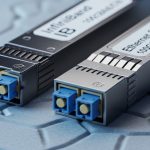
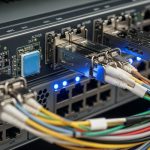
When a link flaps or a transceiver is rejected, network admins lose more than bandwidth; they lose scheduled work and trust in change control. This article helps you validate Aruba transceiver compatibility using switch model behavior, DOM telemetry, and optical/fiber constraints. It is written for engineers who deploy optics in production and need repeatable checks before they roll a module into a rack.
Why Aruba optics get rejected: the compatibility layers that matter
“Compatibility” is not one switch setting; it is a stack of constraints that can block a module at insertion time or later during link negotiation. In practice, Aruba Ethernet switches often enforce rules around supported form factor, data rate, optics standard, and sometimes vendor-specific calibration behavior. Even when the module lights up, DOM (Digital Optical Monitoring) values can fall outside the switch’s acceptable ranges and trigger port disable or flapping. To stay resilient, treat the verification process as a pre-flight checklist rather than a one-time purchase decision.
Hardware layer: form factor and electrical signaling
First, confirm the physical and electrical interface match: SFP, SFP+, SFP28, QSFP+, QSFP28, or Aruba’s supported high-density variants. A mismatch here can present as “module not recognized” or a port that never transitions to link-up. For field reality, I have seen 10G SFP+ ports reject an SFP module even if the fiber type is correct, because the switch expects specific serial communication parameters and optical class behavior.
Optical layer: wavelength, fiber type, and link budget
Second, confirm the optics standard and wavelength align with your fiber plant and distance. For example, 10G SR uses 850 nm over multimode fiber, while 10G LR uses 1310 nm over single-mode fiber. A module can be electrically “accepted” yet still fail to achieve the target BER if the fiber core size (OM3 vs OM4) or patch loss is off.
Management layer: DOM support and threshold behavior
Third, DOM support matters. Many switch platforms read vendor-specific DOM registers (temperature, laser bias current, received power). If the transceiver implements DOM differently than expected, the switch may still bring the link up but record errors or refuse to operate under certain thresholds. If you rely on monitoring automation, validate that DOM reads are stable under your cooling conditions.
Pro Tip: In the field, the fastest way to isolate a compatibility problem is to compare DOM values immediately after insertion with values from a known-good module of the same type. If RX power (dBm) is far outside the expected range for your fiber length, you can stop chasing switch firmware settings and focus on patch loss, fiber cleanliness, or wrong fiber type.
Aruba transceiver compatibility checklist with measured acceptance tests
Use this ordered checklist before you deploy optics into a live rack. It is designed to reduce “trial-and-error” swaps and shorten the mean time to restore service.
- Confirm port and transceiver form factor: SFP vs SFP+ vs SFP28 vs QSFP28 must match the switch’s physical cage and expected electrical interface.
- Match data rate and modulation standard: e.g., 10GBASE-SR for 10G SR, 25GBASE-SR for 25G SR, 40GBASE-SR4 for 40G SR4.
- Verify wavelength and fiber type: SR expects 850 nm with multimode; LR expects 1310 nm with single-mode.
- Check reach against real patch loss: do not rely on “spec sheet reach” alone; include connector/patch attenuation and fiber aging.
- Validate DOM support and telemetry stability: confirm temperature and optical power readings remain plausible after 10 to 15 minutes of operation.
- Review operating temperature: hot aisles can push modules toward their upper limits, increasing error rates.
- Minimize vendor lock-in risk: prefer documented compatibility guidance and modules with consistent DOM behavior rather than “random compatible” listings.
Reference testing approach you can run in production
In a live deployment, I typically run a short acceptance window. After inserting the candidate module, I confirm port state, check DOM telemetry (RX/TX power and temperature), and verify traffic with at least a 30-minute continuous flow while monitoring CRC errors and link resets. If the switch exposes optical diagnostics via telemetry, I log RX power trend and error counters to catch marginal modules that only fail after thermal stabilization.
Key specs comparison: 10G SR vs 10G LR and what Aruba ports expect
Below is a practical comparison of common transceiver types you will encounter when validating Aruba transceiver compatibility. Use it to narrow what you should buy, then validate with DOM and link tests on your exact switch models.
| Transceiver type | Wavelength | Typical reach (MM/SM) | Fiber type | Connector | Target data rate | Operating temp |
|---|---|---|---|---|---|---|
| 10GBASE-SR (SFP+) | 850 nm | Up to 300 m (OM3) / 400 m (OM4) | Multimode | LC | 10.3125 Gbps | -40 to +85 C (typical) |
| 10GBASE-LR (SFP+) | 1310 nm | Up to 10 km | Single-mode | LC | 10.3125 Gbps | -40 to +85 C (typical) |
| 25GBASE-SR (SFP28) | 850 nm | Up to 100 m (OM4) (varies by vendor) | Multimode | LC | 25.78125 Gbps | -25 to +70 C (varies) |
For optical standards, anchor your expectations to IEEE Ethernet specifications, such as IEEE 802.3 for 10G and 25G Ethernet physical layers. For operational guidance, consult vendor datasheets for the specific transceiver model you plan to use, and cross-check Aruba switch optics documentation. IEEE 802.3 standard [Source: IEEE Standards Association]

Compatibility examples to look up before you buy
When you evaluate third-party or OEM optics, start with models that have clear documentation and stable DOM behavior. Common examples in the market include Aruba-compatible optics and known SFP/SFP+ SR and LR modules from established OEMs. For instance, you may see modules such as Cisco SFP-10G-SR or Finisar FTLX8571D3BCL referenced in vendor cross-compatibility tables, and third-party modules like FS.com SFP-10GSR-85 are widely used when they match the exact standard and reach requirement. Always confirm the exact part number and data sheet thresholds rather than relying on “same type” wording. [Source: vendor datasheets and certified partner lists]
Real-world deployment: leaf-spine data center with hot-aisle optics
In a 3-tier data center leaf-spine topology with 48-port 10G ToR switches, we ran 10GBASE-SR from servers to ToR and 10GBASE-LR between aggregation and spine using separate fiber trunks. The MM links were OM4 with patch panels and short jumpers, while SM links used LC to LC single-mode patch cords. During a maintenance window, we replaced 18 optics on the ToR side. Two of the replacements initially caused port flaps because the candidate modules reported RX power that was consistently low by about 3 to 4 dB versus the known-good baseline at the same length; the root cause was a wrong patch cord type and one dusty LC connector, not an Aruba firmware issue.
Cost and ROI: OEM vs third-party optics under an uptime model
Price varies heavily by vendor, reach, and whether you need enhanced diagnostics. In many deployments, OEM optics can run roughly $80 to $250 per module depending on speed and reach, while third-party or compatible optics often land in a lower range (commonly $30 to $120), assuming the exact standard and DOM behavior match. The ROI calculation should include not only purchase price, but also labor time for swaps, risk of repeat failures, and the cost of downtime during change windows.
Consider TCO drivers: thermal stress, connector hygiene, and consistent monitoring. A slightly higher module price that reduces failure rates can outperform cheaper optics if your mean time between failures improves meaningfully. In practice, if you can cut optic-related incidents by even a few events per year across a multi-rack environment, the labor and outage avoidance can outweigh the module cost delta.
Common pitfalls and troubleshooting tips for Aruba transceiver compatibility
Even experienced teams hit predictable failure modes. Here are concrete issues I have seen repeatedly, with root causes and fixes.
Pitfall 1: “Link-up but traffic errors” due to fiber mismatch
Root cause: A 850 nm SR module installed into a path that expects single-mode optics, or OM3/OM4 mismatch that reduces margin. Sometimes the cable plant is labeled incorrectly after renovations.
Solution: Confirm wavelength requirements and test with a known-good module of the correct standard. Measure link margin indirectly by comparing RX power and CRC/packet error counters under stable traffic.
Pitfall 2: Port flaps caused by DOM threshold behavior
Root cause: DOM implementation differences or marginal optics that report RX power near the switch’s internal thresholds. The link can appear stable initially, then destabilize as temperature rises.
Solution: Compare DOM telemetry from the candidate module vs a known-good module at the same port. If temperature and RX power diverge, treat it as an optics quality or threshold mismatch, not a cabling issue.
Pitfall 3: “Module not recognized” after insertion
Root cause: Form factor mismatch, a partially seated cage, or using a transceiver that lacks the expected electrical interface behavior for that port type.
Solution: Reseat the module carefully, inspect for bent pins, and verify the transceiver standard matches the port’s expected speed and type. Confirm the switch model supports that exact form factor and data rate.
Pitfall 4: High error rate from dirty LC connectors
Root cause: Dust or micro-scratches on LC endfaces cause elevated loss that pushes the receiver toward its operating limit.
Solution: Clean connectors using approved procedures and inspect with a fiber microscope before re-testing. Re-check RX power after cleaning; if it improves by several dB, you have your culprit.
FAQ: Aruba transceiver compatibility questions engineers ask
How do I confirm Aruba transceiver compatibility before rollout?
Start by matching form factor, data rate, and fiber standard to the exact switch port type. Then validate DOM telemetry stability and run a short traffic acceptance test while monitoring CRC errors and link resets. This avoids surprises during the maintenance window. [Source: Aruba switch optics operational practices and vendor datasheets]
Can I use third-party optics with Aruba switches?
Often yes, but compatibility depends on the exact module standard and DOM behavior. Use documented compatibility guidance and verify with DOM readings and error counters after insertion. If the switch rejects the module or flaps under load, do not keep iterating blindly; isolate the mismatch.
What DOM values should I watch for during testing?
Track temperature, laser bias current (if available), and RX optical power in dBm. Compare the candidate module against a known-good baseline at the same port and fiber length. Large deviations or unstable readings under thermal load are strong indicators of incompatibility or marginal optics.
What happens if I install the wrong wavelength transceiver?
The link may fail entirely or may not meet the expected BER, leading to errors or intermittent drops. For example, using an 850 nm SR module on a path intended for single-mode 1310 nm LR can produce no link or severe degradation. Confirm wavelength and fiber type before troubleshooting deeper layers.
Why does a module work for a day and then fail?
Thermal cycling, connector contamination, and marginal optical power margins can cause delayed failures. A module that is near threshold may pass initial checks but fail after the system reaches steady-state temperature. Re-check DOM telemetry after temperature stabilizes and inspect connectors with a fiber microscope.
Where can I find authoritative compatibility references?
Use IEEE 802.3 for physical layer definitions and consult the Aruba switch documentation and vendor datasheets for the transceiver part number. Also leverage reputable tech media and partner documentation that lists tested modules. Aruba Networks
If you want a smooth change process, treat Aruba transceiver compatibility as a repeatable engineering workflow: match standards, validate DOM telemetry, and test under realistic traffic. Next, review how to choose fiber optic transceivers for high-density data centers to align optics decisions with your fiber plant and link budget.
Author bio: I deploy and troubleshoot high-density Ethernet optics in production data centers, focusing on DOM telemetry, optical budgets, and failure mode analysis. I write from hands-on field experience with switch port behavior, fiber cleanliness practices, and vendor datasheet constraints.