
If you run a mixed network and you are tired of “it should work” optics, this guide is for you. It focuses on selecting Arista SFP transceiver modules that behave predictably when you plug them into Cisco and Juniper interfaces. You will get a practical checklist, a specs comparison table using common model families, and troubleshooting steps that match what field teams see.
Why Arista SFP modules behave differently in Cisco vs Juniper ports
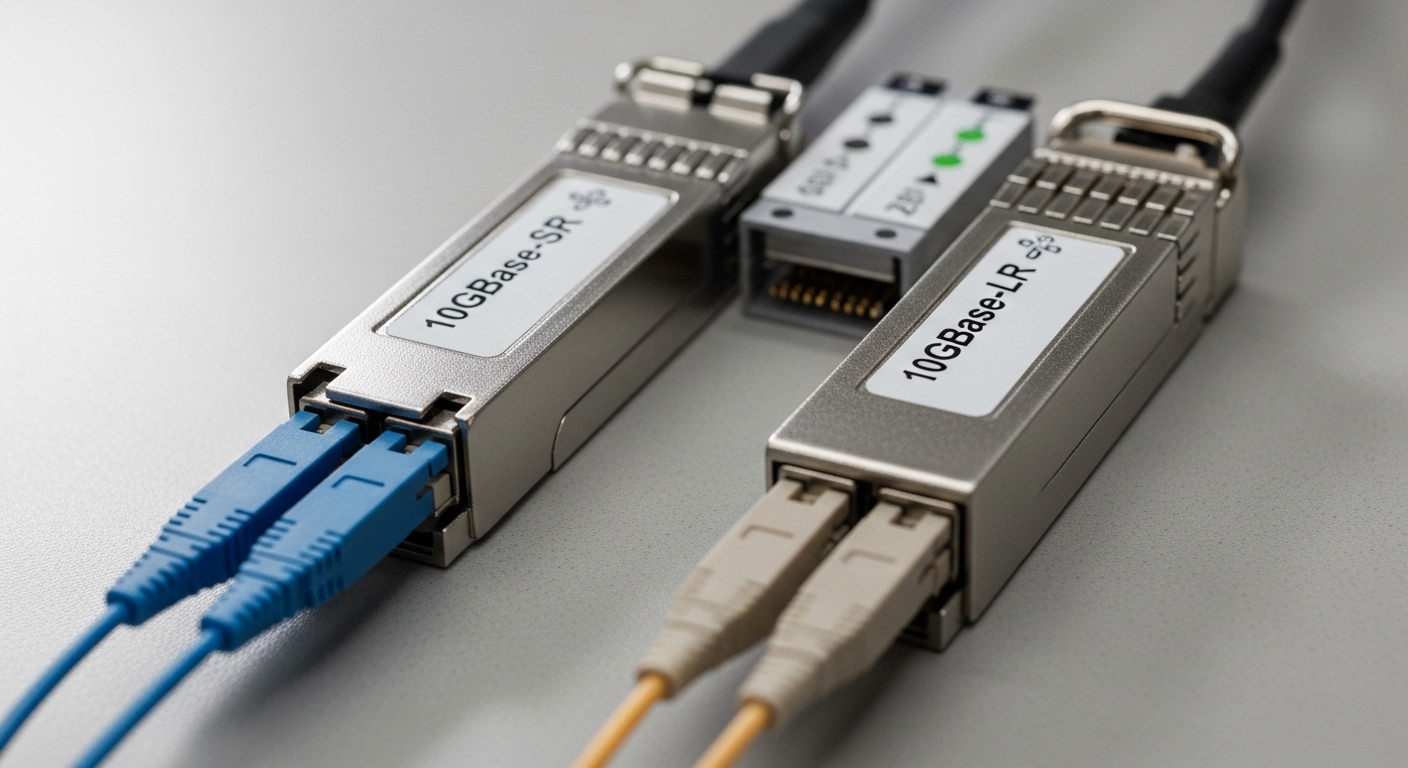
In day-to-day operations, “compatibility” usually means three things: electrical signaling meets the port’s expectations, the optical link budget is sufficient, and the module is accepted by the switch’s diagnostics. Most modern small form-factor pluggables follow IEEE 802.3 specifications for the PHY layer and the module management interface (SFF-8472 for optical module diagnostics). But switch vendors can enforce additional requirements like DOM thresholds, vendor ID handling, and reach support policies. That is why an Arista SFP that runs fine on one vendor can show link flaps or DOM warnings on another.
From a field perspective, the biggest practical differences come from: (1) whether the switch expects specific cable equalization settings, (2) how aggressively it validates EEPROM fields, and (3) whether it enforces optic “type” constraints (for example, SR vs LR in a module category mapped to a speed profile). If you are mixing ecosystems, plan for a validation step that includes link bring-up, DOM readout, and error counters under load.
Compatibility map: SFP types, distances, and what to verify
Before you compare specific optics, align the interface speed and fiber type. Most Arista SFP optics you will encounter in the Cisco and Juniper world fall into 1G and 10G classes, often with SR (850 nm multimode) and LR (1310 nm single-mode) variants. The connector standard matters too: LC is typical for fiber SFPs, while some legacy copper SFPs use RJ-45.
Specs snapshot for common SFP families
Below is a pragmatic comparison using widely deployed SFP families. Exact reach depends on fiber grade, patch loss, and link budget. Always confirm the vendor datasheet for the specific part number you are buying.
| Arista SFP family (examples) | Data rate | Wavelength | Reach (typical) | Connector | Power (typical) | Operating temp | DOM |
|---|---|---|---|---|---|---|---|
| 10GBASE-SR (e.g., FS.com SFP-10GSR-85, Finisar FTLX8571D3BCL) | 10.3125 Gb/s | 850 nm | ~300 m over OM3 (varies by loss) | LC | ~0.8 W to ~1.5 W | 0 to 70 C (typical) | Yes (SFF-8472) |
| 10GBASE-LR (e.g., Cisco compatible 10G LR) | 10.3125 Gb/s | 1310 nm | ~10 km over SMF | LC | ~1.0 W to ~2.0 W | -5 to 70 C (varies) | Yes (SFF-8472) |
| 1GBASE-SX (legacy campus variants) | 1.25 Gb/s | 850 nm | ~550 m over OM2, ~550 m over OM3 (varies) | LC | ~0.6 W to ~1.2 W | 0 to 70 C (typical) | Yes (SFF-8472) |
Key compatibility verify points you should apply across Cisco and Juniper:
- Speed profile: ensure the switch interface mode matches the optic type (SR vs LR) and supported rate.
- DOM behavior: confirm the switch reads temperature, TX bias, RX power, and alarms without “unsupported module” warnings.
- EEPROM fields: some platforms validate vendor and diagnostic thresholds strictly; mismatches can trigger refusal or degraded mode.
- Link budget: validate fiber type (OM3 vs OM4 vs OS2), patch cord lengths, and connector cleanliness.
Decision checklist: choose Arista SFP optics that pass Cisco and Juniper acceptance
Use this ordered checklist the same way your team would run an order review. If you can tick every item, your failure rate drops dramatically.
- Match the interface speed: confirm the port is configured for 1G or 10G and that the optic family matches (BASE-SX, BASE-SR, BASE-LR).
- Confirm fiber type and reach: OM3/OM4 for SR, OS2 for LR. Include patch cords and splices in your loss budget.
- Check connector and polarity: LC connectors should be clean; verify Tx to Rx polarity on both ends.
- Validate DOM support: confirm the platform supports SFF-8472 DOM and will not block modules based on threshold fields.
- Operating temperature rating: your chassis ambient might run hot; verify the module’s temperature range matches the vendor datasheet.
- Switch compatibility policy: some Cisco and Juniper models enforce stricter optic acceptance. If possible, test a single module in the target port before scaling.
- Vendor lock-in risk: plan for procurement flexibility. If you rely on one vendor’s exact ID fields, you may pay more later or face RMAs that are slower.
Pro Tip: In mixed-vendor networks, “it links up” is not the pass condition. Always check real-time interface counters (CRC errors, RX LOS events) and DOM readings after 15 to 30 minutes of traffic. Many optics that survive a cold plug fail under thermal drift or marginal power levels, and the switch will only reveal it through DOM alarms and error counters.
Field comparison: OEM vs third-party optics in mixed vendor networks
When teams compare Cisco-branded or Juniper-compatible optics versus third-party modules, the decision is usually about total cost and operational risk, not just unit price. OEM optics often provide the cleanest path for acceptance and predictable RMA handling, but third-party optics can be cost-effective if you choose reputable vendors and test compatibility. The hidden cost is downtime and labor when a module is rejected or causes intermittent errors.
What to look for when mixing vendors
- DOM thresholds and alarms: some third-party modules are “compatible” but report different bias current or temperature scaling. Switches with strict alarm thresholds can trigger port err-disable behaviors.
- Optical power class: LR modules typically have different transmit power ranges than SR modules; a port expecting a certain class may still link but show higher BER.
- Transceiver age and calibration: older modules can drift; if you swap optics across vendors, keep a consistent inventory strategy.
From an ROI lens, a realistic price band in the market (varies by speed and reach) is often:
- 10GBASE-SR SFP: roughly $40 to $150 per module
- 10GBASE-LR SFP: roughly $90 to $250 per module
- OEM premium: frequently 1.2x to 2.5x higher than well-specified third-party options
TCO usually includes module cost plus expected labor for swaps. If a bad optic costs your team 2 to 4 hours to troubleshoot (patch checks, DOM checks, counter checks, and possible truck roll), the “cheap” module can become the most expensive line item fast.
Common mistakes and troubleshooting tips for Arista SFP in mixed environments
Here are the issues that most often cause pain when you drop an Arista SFP into Cisco and Juniper ports, even when the module looks “correct” on paper.
Link comes up briefly then flaps or shows RX LOS
Root cause: marginal optical power, dirty connectors, or fiber polarity mismatch. In SR links, OM3/OM4 patch cords with higher-than-expected insertion loss are a frequent culprit. Solution: clean LC ends with approved fiber cleaning tools, verify polarity, then re-measure link loss and compare to the optic’s link budget. If you have spare optics, swap to isolate whether the issue follows the module or the fiber.
Switch reports “unsupported transceiver” or DOM warnings
Root cause: EEPROM field validation differences. Some platforms are strict about vendor IDs, diagnostic thresholds, or module “type” mapping. Solution: confirm the exact SFP type (SR vs LR) and speed; try a known-good module model on the same port. If the acceptance fails consistently, you likely need a different optic SKU with matching DOM behavior for that switch family.
High CRC errors under load but low errors at idle
Root cause: insufficient link margin (too-long fiber, too many patch cords), or incorrect interface speed negotiation. Solution: run traffic while monitoring CRC/BER-related counters. Reduce link length, replace patch cords with lower-loss certified jumpers, and confirm the port is locked to the correct speed mode. Also check for duplex mismatch only if you are using copper SFPs; fiber SFPs are not duplex-negotiated the same way.
Works in one chassis but fails in another
Root cause: different port optics support matrix and different temperature/airflow behavior. Solution: validate on the exact target line card or port group. If only specific slots fail, inspect airflow and confirm the module temperature stays within rated limits under sustained load.
FAQ: buying Arista SFP optics for Cisco and Juniper compatibility
Will an Arista SFP work in Cisco and Juniper without configuration changes?
Often, yes for standard SR or LR SFP types, because the PHY layer follows IEEE 802.3. But some platforms validate EEPROM fields and may require a compatible optic SKU or will warn about DOM thresholds. Plan a quick acceptance test on the exact port model before scaling.
What fiber type should I use with Arista SFP SR optics?
Use multimode fiber for SR, typically OM3 or OM4 depending on reach requirements. Verify patch cord lengths and insertion loss, not just the fiber type on the building plans. Clean connectors every time you re-seat an SFP.
How do I confirm DOM is supported on both switches?
Check the switch CLI or monitoring interface for DOM availability and alarm status after insertion. You want to see stable temperature and RX power readings without “unsupported module” messages. If you only see partial DOM fields on one vendor, treat that as a compatibility risk.
Are third-party optics safe for production?
They can be, if they are reputable, correctly specced for the distance, and tested for acceptance in your exact switch models. The risk is not just link failure; it is operational noise like err-disabled ports, alarm floods, or intermittent BER issues. Use a staged rollout: pilot in one rack, verify counters for 30 minutes to a day, then expand.
What is the fastest troubleshooting workflow when an SFP fails?
Swap optics with a known-good module, verify polarity and connector cleanliness, then check DOM readings and interface counters under traffic. If errors increase only under load, re-check link budget and replace any high-loss patch cords. If the switch refuses the module, you are dealing with acceptance/EEPROM policy rather than optics physics.
Where can I confirm standards and module diagnostic behavior?
Start with the IEEE 802.3 family relevant to your SFP speed and the SFF-8472 diagnostics model referenced in vendor documentation. For practical vendor behavior, review the specific Cisco and Juniper transceiver compatibility matrices and the optic datasheet for the exact part number you plan to deploy.
Bottom line: Arista SFP optics can work across Cisco and Juniper, but compatibility is a mix of PHY correctness, DOM acceptance, and real link margin. If you want the smoothest rollout, use the checklist above and validate with counters plus DOM after you install the first pair. Next, review fiber optic link budget and DOM monitoring to tighten reach calculations and reduce surprises.
Author bio: I deploy and validate optical transceivers in mixed-vendor data centers, focusing on acceptance behavior, DOM telemetry, and link error counters. I help teams cut downtime by turning compatibility claims into measurable test plans and ROI math.
