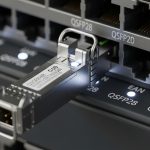
In a leaf-spine data center, a single wrong transceiver choice can turn into weeks of rework: remounting patch panels, re-pulling fiber, or chasing intermittent link flaps. This article helps network and data center engineers decide between 100GBase-SR4 and 100GBase-LR4 using QSFP28 optics, with practical cabling and operational criteria. You will also get field troubleshooting patterns and a cost-and-ROI way to compare options without guessing.
Why this choice matters in real data center cabling

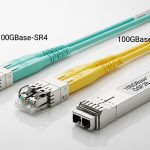
Both 100GBase-SR4 and 100GBase-LR4 run 100 Gb/s over QSFP28 using four lanes (often referred to as SR4 and LR4). The difference is the optical reach and typical fiber plant assumptions: SR4 is usually paired with OM3 or OM4 multimode fiber for short-reach topologies, while LR4 is typically associated with single-mode fiber for longer reach. In day-to-day operations, the decision affects not just distance, but also how many fibers you must allocate per link, how much optical budget margin you have, and how sensitive you are to patch cord quality and connector cleanliness.
From a standards perspective, both align with IEEE 802.3 100GBASE optical transport families, while the exact implementation details live in vendor datasheets for each transceiver SKU and module type. For authoritative cabling and link requirements, also cross-check ANSI/TIA-568 series cabling guidance and your data center structured cabling design rules. IEEE 802.3 standard overview
Core technical differences: reach, fiber type, and optics budget
Engineers usually start with distance and fiber type, then check whether the switch supports the exact optics mode. SR4 is designed for short reach using multimode optics at 850 nm, while LR4 uses longer-wavelength optics around 1310 nm on single-mode fiber. Because multimode and single-mode fibers have different modal behavior, you cannot treat these as interchangeable without validating the fiber plant and transceiver compatibility.
| Parameter | 100GBase-SR4 (QSFP28) | 100GBase-LR4 (QSFP28) |
|---|---|---|
| Typical wavelength | ~850 nm | ~1310 nm |
| Fiber type | OM3/OM4 multimode (often OM4 preferred) | OS2 single-mode |
| Typical reach | ~100 m on OM4 (varies by vendor) | ~10 km (varies by vendor) |
| Connector style | Commonly MPO/MTP (12-fiber harness for 4 lanes) | Commonly LC duplex (one pair per lane group) |
| Link monitoring | DOM support varies by vendor; many support digital diagnostics | DOM support varies by vendor; many support digital diagnostics |
| Operating temp | Commonly 0 to 70 C for standard, or extended options | Commonly 0 to 70 C for standard, or extended options |
| Power (typical) | Often in the ~3 to 6 W range depending on vendor | Often in the ~3 to 6 W range depending on vendor |
| Main cabling risk | Multimode patch cord/connector cleanliness and OM4 quality | Single-mode splices, endface cleanliness, and budget margin |
In practice, the reach numbers are only the start. You must also account for the loss from MPO/MTP harnesses, patch cords, adapters, and any splices. For SR4, modal bandwidth of the installed OM4 and the cleanliness of the MPO endfaces can dominate link margin. For LR4, the fiber attenuation and splice/connector loss budget dominate, so the quality of the OS2 plant matters.
Pro Tip: If your SR4 link is “up but flapping,” do not immediately blame the transceiver. Field teams often find that a single dirty MPO/MTP endface or a slightly mis-seated harness can reduce optical power just enough to trigger FEC/receiver thresholds under temperature swings. Cleaning and reseating the MPO first is usually faster than swapping modules.
Decision checklist: how to choose without re-cabling
Use this ordered checklist the way onsite engineers do during cutover planning. It reduces the chance you buy the right model but for the wrong fiber plant or switch interface profile.
- Distance and topology: Confirm whether the run is within SR4 reach (typically up to about 100 m on OM4) or whether you need LR4 for longer campus or inter-row links.
- Installed fiber type: Identify whether you have OM3/OM4 multimode or OS2 single-mode. Do not assume; check labeling and test results.
- Connector and polarity: SR4 frequently uses MPO/MTP harnesses; verify polarity rules and adapter types. LR4 often uses LC duplex; verify pairing and labeling at both ends.
- Switch compatibility: Validate the switch supports the specific QSFP28 optics type and lane mapping. Some platforms are picky about third-party optics or particular DOM implementations.
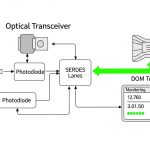
- DOM and monitoring: Prefer modules with digital optical monitoring so you can track received power and error counters before problems escalate.
- Operating temperature: Check whether you need extended temperature (-5 to 70 C or similar) for high-heat zones near power supplies or in constrained airflow.
- Vendor lock-in risk: OEM modules may be more predictable for diagnostics; third-party can be cost-effective but should be validated on your exact switch model.
Deployment scenario: leaf-spine with 10 km interconnect options
Consider a 3-tier data center leaf-spine topology with 48-port 100G ToR switches feeding two spine layers. Within each row, the leaf-to-spine distance is about 35 to 60 m through patch panels and overhead trays, so SR4 over OM4 is usually sufficient. For a separate inter-building link where fiber runs reach 6 to 9 km through a structured campus, the team prefers LR4 over OS2 to avoid building a dedicated multimode plant with unrealistic reach.
In this scenario, SR4 links are terminated with MPO/MTP harnesses into trunking, while LR4 uses LC duplex at both ends. During commissioning, engineers validate optical power using the switch DOM counters and confirm that receive power stays within the vendor’s specified operating range under worst-case temperature. If a link fails, they first clean MPO/LC connectors and verify polarity, then check optical power and error counters before swapping optics.
Common pitfalls and troubleshooting patterns
These are the mistakes that most often cause avoidable downtime, along with the root cause and the fastest corrective action.
SR4 installed on the wrong fiber type
Root cause: SR4 optics expect multimode (OM3/OM4). If OS2 single-mode is mistakenly used, the link budget and modal behavior will not match, leading to low received power or no lock. Solution: Verify fiber type with test records or an OTDR-based validation plan, then re-terminate or re-patch to the correct fiber bundle.
MPO polarity and adapter mismatch
Root cause: MPO/MTP polarity rules differ by harness type and adapter wiring. A polarity mismatch can cause swapped lanes and high BER even when the link appears “connected.” Solution: Use the correct polarity method for your MPO harness (and matching adapter), then confirm lane alignment via vendor guidance and DOM/BER counters.
Dirty connectors causing intermittent flaps
Root cause: Endface contamination is a top driver of intermittent receiver issues, especially with dense MPO harnessing where dust and micro-scratches are common. Solution: Clean with approved fiber cleaning tools, inspect with a scope, and re-seat the connector/harness. Only after that, measure DOM received power and swap optics.
Third-party optics not aligned with switch diagnostics expectations
Root cause: Some third-party QSFP28 modules may report DOM values differently or trigger compatibility checks on certain switch models. Solution: Validate in a staging rack first, log DOM behavior under load, and confirm the switch supports that vendor’s transceiver ID profile.
Cost and ROI: what to budget for over a refresh cycle
Typical street pricing varies by vendor and region, but as a planning baseline many teams see OEM SR4 QSFP28 modules priced higher than third-party options, often with third-party at a noticeable discount. LR4 modules are usually more expensive than SR4 because they require different optics and more stringent single-mode performance. For total cost of ownership, consider not only the module price but also: labor for re-termination, testing time, spares inventory strategy, and failure/return handling.
If your cabling is already OM4 and distances are under about 100 m, SR4 generally minimizes spend and reduces operational risk. If you anticipate future expansion across longer distances, LR4 can reduce the chance you later need a costly multimode retrofit. In practice, a hybrid approach is common: SR4 for intra-row and LR4 only where the fiber plant and reach requirements demand it.
FAQ
Is 100GBase-SR4 interchangeable with 100GBase-LR4 on the same switch?
No. Even though both are QSFP28 at 100G with four lanes, they are built for different fiber types and reach assumptions. SR4 is designed for multimode (often OM4), while LR4 is designed for single-mode (OS2). Always match optics to your installed fiber and validate switch compatibility.
Do I need MPO/MTP for 100GBase-SR4?
Most 100GBase-SR4 QSFP28 implementations use MPO/MTP harnesses for the four-lane interface. Some systems may use specific breakout strategies, but the common operational expectation is MPO/MTP. Confirm connector type in the vendor datasheet and your switch cabling guide.
How can I confirm link margin during commissioning?
Use QSFP28 DOM to monitor received optical power and link error counters. Then validate that BER or equivalent error metrics remain within acceptable thresholds under steady load. If you see flaps, clean and re-seat connectors first, especially for MPO endfaces.
What is the main advantage of LR4 in data center cabling?
The key advantage is reach on single-mode fiber, which supports much longer distances than SR4. LR4 is also a natural fit for inter-building or cross-row links when the structured cabling plant already includes OS2. The tradeoff is typically higher module cost and stricter attention to optical budget.
Can I use third-party optics for 100GBase-SR4 or LR4?
Often yes, but you should validate on your exact switch model and firmware. Check DOM behavior, support status in vendor compatibility lists, and test in a staging rack before scaling. Budget savings can be real, but avoid surprise compatibility issues during cutover.
Which should I standardize on for new deployments?
Standardize SR4 when you have OM4 and the distances are within SR4 reach. Standardize LR4 when you know you will need longer reach over OS2 or when the fiber plant is already single-mode. Many teams standardize both and apply a clear distance-and-fiber policy to reduce operational chaos.
If you align