
If your uplink suddenly drops, the blame often lands on the switch ports, but many incidents are actually transceiver failure troubleshooting problems: bad optics, dirty connectors, mismatched power levels, or a DOM alarm that gets ignored. This article helps network engineers and field techs isolate the root cause quickly using measurable checks (link counters, optical power, and DOM thresholds) while keeping downtime low. I will also cover what I see in the field when a transceiver “looks fine” but fails under load.
What “transceiver failure” looks like in real fiber links
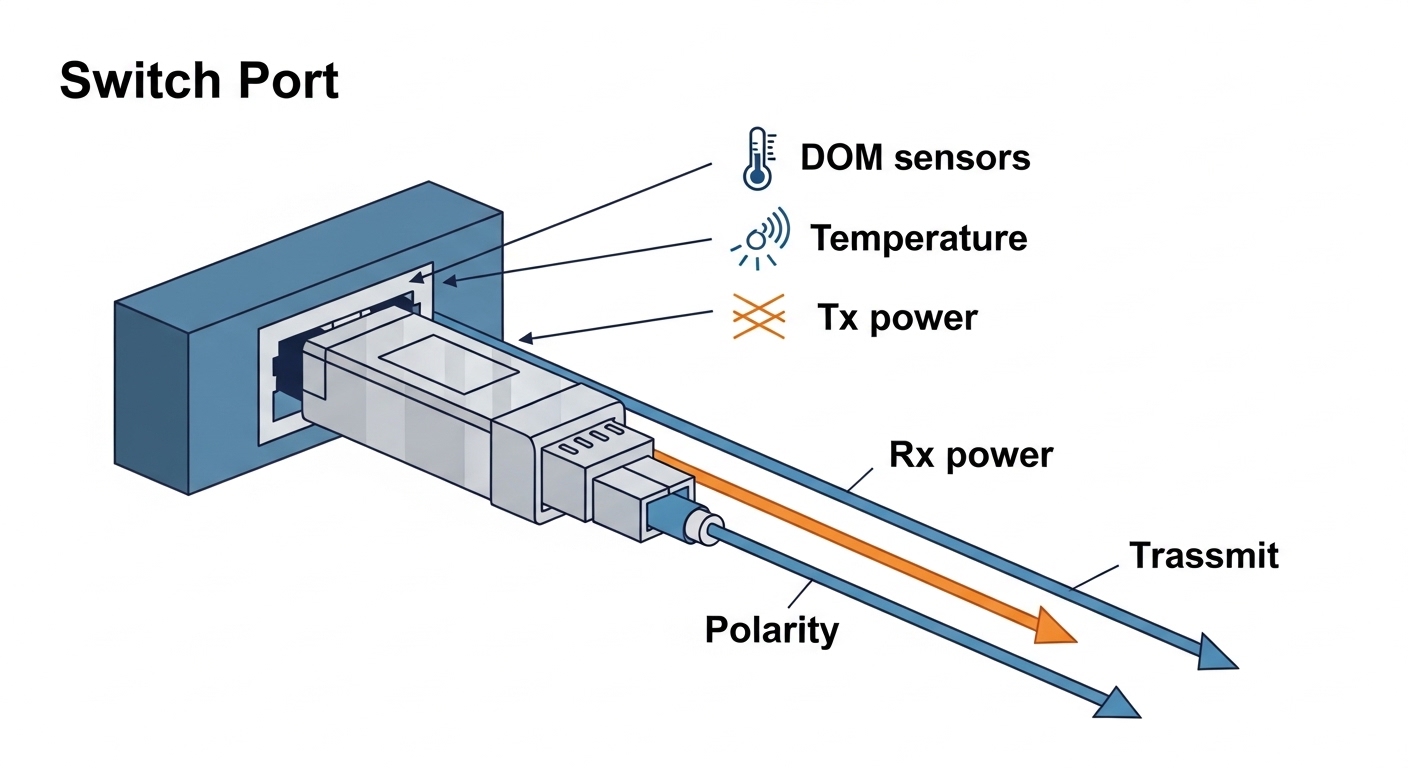
In practice, optical transceiver failures rarely present as a single obvious event. You might see flapping link states, CRC spikes, intermittent packet loss, or a port that comes up then collapses after traffic ramps. On many platforms, DOM monitoring will show TX bias or RX power drifting toward limits, even when the link seems stable at first. The tricky part is separating optical issues from physical layer problems like fiber polarity, connector contamination, or a wrong wavelength grade.
Common failure symptoms you can measure
Start with the switch’s interface counters and transceiver diagnostics. Look for a sudden increase in FCS/CRC errors, input discard, or symbol errors after swapping a module. If the port never reaches “up,” check whether the transceiver is recognized and whether the DOM page reports alarms. For 10G to 100G optics, a “link up but errors” pattern often points to marginal optical power, dirty ferrules, or an aging laser.
Deployment reality: what fails first
In a typical enterprise wiring closet, the first failures I see are contamination and mechanical stress. Dust on LC/SC end faces can attenuate RX power enough to pass light briefly, then fail as temperatures and power levels shift. The second most common category is compatibility: a transceiver that is electrically fine but not aligned with the host’s expected vendor-specific behaviors for DOM or power class handling. Finally, true module aging shows up as TX bias climbing and output power dropping under the same traffic profile.
Field workflow for transceiver failure troubleshooting (fast and repeatable)
A good workflow keeps you from “shotgunning” optics. I use a consistent order: confirm port state, confirm transceiver recognition, validate fiber path and polarity, then measure optical power. If you do it in that sequence, you avoid wasting time on a module that never had a chance to work because the connector was flipped or the patch cord was the wrong type.
Confirm the port and transceiver identity
Check the switch CLI for interface status and transceiver details. Record vendor, part number, serial, and DOM readings if available. On Cisco IOS XE and NX-OS style CLIs, you often can retrieve DOM values like RX power, TX power, temperature, and voltage; on Juniper-style systems you can query “transceiver diagnostics” similarly. If the host reports an “unsupported module” or “DOM not present,” treat it as an acceptance failure before chasing optics.
Rule out fiber polarity and wrong fiber type
For most duplex links, polarity matters. A single flipped patch cord can swap RX and TX, causing link failure or extreme errors depending on whether the optics are designed for polarity-insensitive operation. Also verify that multimode jumpers use the expected OM grade and that single-mode optics are not used on multimode plant. If you are in a mixed OM3/OM4 environment, remember that link budgets depend heavily on bandwidth and modal distribution.
Inspect and clean connectors like you mean it
Even a “recently installed” fiber can be contaminated. Inspect with a scope whenever possible; if you do not have one, at least clean with a lint-free method using proper wipes and alcohol suited for optics. I typically re-clean both ends and then re-seat the transceiver. If you see a change from no-link to link-up, you have your answer and you can stop there.
Measure optical power and compare against thresholds
Use the switch DOM readings or an external optical power meter when DOM is unreliable. For many transceivers, DOM alarms trigger when RX power is too low or TX bias is too high. In my field notes, the most actionable pattern is rising TX bias + falling optical output, which often indicates laser aging. If you have an external meter, measure at the receive side after the patch panel to include realistic losses.
Pro Tip: If DOM shows “link up” but RX power is hovering near the low threshold, don’t assume it is stable. I’ve seen links pass at idle and then fail during traffic bursts because temperature compensation and laser output droop reduce margin. Add a small traffic load while watching DOM temperature and RX power to catch marginal optics early.
Key specs that determine whether an optics swap should work
When transceiver failure troubleshooting starts, it helps to compare the module’s electrical and optical expectations to what the switch port and fiber plant can support. Mismatched wavelength, incorrect fiber type, or wrong reach class can cause “it works for a minute” behavior or persistent CRC errors. Below is a practical comparison table that matches the specs I verify during on-site triage.
| Transceiver type | Wavelength | Typical reach | Connector | Data rate | Operating temp | DOM support |
|---|---|---|---|---|---|---|
| SFP+ 10G SR (multimode) | 850 nm | ~300 m (OM3), ~400 m (OM4) | LC duplex | 10G | 0 to 70 C (common) | Yes (vendor dependent) |
| SFP+ 10G LR (single-mode) | 1310 nm | ~10 km | LC duplex | 10G | -5 to 70 C (common) | Yes (vendor dependent) |
| QSFP28 100G SR4 | 850 nm | ~100 m (OM3), ~150 m (OM4) | MPO-12 (or MPO-16 depending) | 100G | 0 to 70 C (common) | Yes (vendor dependent) |
| QSFP28 100G LR4 | ~1310 nm (4 lanes) | ~10 km | LC duplex | 100G | -5 to 70 C (common) | Yes (vendor dependent) |
Where the specs actually bite you
The reach number is not just marketing; it is derived from a link budget that includes fiber attenuation, connector loss, and the transceiver receiver sensitivity. If you are using a “near the edge” reach, even one extra patch panel and a few dirty connectors can push RX power below sensitivity. For QSFP28 SR4, MPO polarity and lane mapping can be a silent killer if you are not using the correct polarity adapters.
Compatibility and electrical behavior
IEEE 802.3 defines optical PHY behavior for many Ethernet rates, but vendors still implement transceiver details differently. That is why I check the switch vendor compatibility list when possible and I validate DOM fields when I install third-party modules. The IEEE transceiver standards and host interface expectations are a starting point, but you should still treat the switch datasheet as the authority for supported optics. [Source: IEEE 802.3 Ethernet Physical Layer specifications] [[EXT:https://standards.ieee.org/standard/]]
Decision checklist for choosing a replacement during transceiver failure troubleshooting
When you swap a module, you want a replacement that will survive the same operating conditions and play nicely with the host’s diagnostics. Engineers usually weigh the factors below in the order shown, because the early checks prevent expensive misbuys and repeated truck rolls.
- Distance and fiber type: Confirm multimode OM grade or single-mode OS2, plus expected loss and patch panel count.
- Wavelength and reach class: Ensure the module matches 850 nm vs 1310/1550 nm requirements and reach target.
- Connector and polarity: LC duplex vs MPO, plus polarity adapters for MPO-terminated links.
- Switch compatibility: Check the switch model’s supported optics list and transceiver vendor guidance.
- Data rate and lane mapping: SR4/LR4 require correct lane behavior; do not assume “100G is 100G.”
- DOM support and thresholds: Verify the host reads DOM and that alarms are meaningful (not ignored or misreported).
- Operating temperature: Match the transceiver temperature range to your cabinet and airflow conditions.
- Vendor lock-in risk: Weigh OEM optics vs third-party; plan for spare strategy to reduce downtime.
What I look for in DOM during selection
Before shipping a replacement into production, I compare DOM baselines between the failing module and a known-good one from the same batch. If the failing module had elevated temperature or abnormal bias values, the replacement should show normal stability under similar traffic. Some third-party modules report DOM in a way that is technically compliant but less consistent; that can slow troubleshooting if your alarms are noisy.
Common mistakes and troubleshooting tips that actually work
Below are failure modes I have personally seen during transceiver failure troubleshooting, along with the root cause and what fixed it. These are the “avoid repeating the same mistake twice” items that save hours on outage calls.
Swapping optics without cleaning
Root cause: Dust or micro-scratches on LC/MPO end faces increase attenuation and cause intermittent link drops. The new module just makes the failure more confusing.
Solution: Inspect with a fiber scope, clean both ends, and re-seat connectors. If you use MPO, confirm polarity adapter orientation.
Wrong polarity adapter or flipped MPO harness
Root cause: For SR4 and LR4 style multi-lane optics, lane mapping and polarity adapters determine which lane is received. A mismatch can produce link flaps or high CRC errors without obvious “no link” behavior.
Solution: Verify adapter type and orientation per the vendor’s polarity guide. Test with a known-good patch cord and confirm lane mapping.
Ignoring DOM alarms because “the link is up”
Root cause: The receiver can be operating near sensitivity limits. Errors may remain low at idle and then spike under load as temperature changes.
Solution: Monitor DOM values during traffic tests. If RX power or bias trends toward limits, replace the module before it fails completely.
Using the right connector, wrong fiber grade
Root cause: OM3 vs OM4 differences can matter for 10G/25G/40G/100G multimode reach. A link might negotiate but will not hold under worst-case conditions.
Solution: Validate OM grade, measure end-to-end loss, and re-run the link budget. If in doubt, switch to single-mode optics with a confirmed OS2 path.
Assuming “third-party means bad” or “OEM means perfect”
Root cause: Both OEM and third-party optics can fail due to shock, electrostatic discharge, bad handling, or poor thermal conditions. The difference is often consistency and documentation.
Solution: Use vendor compatibility lists, buy from reputable suppliers, and keep spares tested in a lab or staging rack.
Cost and ROI: what transceiver failure troubleshooting can save
In the real world, the cost of an optics failure is often dominated by downtime and labor, not the transceiver itself. OEM SFP-10G-SR style modules commonly cost more than third-party equivalents, but they may have better documentation and smoother compatibility with specific switch models. Third-party optics can be cost-effective, but you should factor potential higher failure rates, more frequent DOM quirks, and the risk of “works in one chassis, not another.”
As a rough market range, many 10G optics land in the tens of dollars for basic modules and can climb higher for branded OEM and 40G/100G variants. A single truck roll and a few hours of downtime can dwarf the optics price, so the ROI comes from reducing repeat swaps and catching marginal optics early with DOM monitoring. Also consider total cost of ownership: cleaning supplies, fiber scopes, and spares plan often prevent recurring failures more reliably than chasing “the best brand.”
FAQ: transceiver failure troubleshooting for working engineers
How do I tell if the transceiver or the port is the problem?
Swap the module into a known-good port, and if possible test a known-good module in the suspect port. If the issue follows the module, you likely have a transceiver failure; if it follows the port, check port optics calibration, firmware, and physical damage to the cage.
Can DOM data confirm a failing optical module?
Yes, often. Elevated TX bias, abnormal temperature, or RX power drifting toward low thresholds are strong indicators of aging or contamination. Still, DOM can be noisy or partially unsupported depending on vendor and switch platform.
What is the fastest way to fix intermittent link flaps?
Clean and inspect connectors first, then verify polarity and patch cord mapping. After that, watch DOM while applying traffic load to see whether errors correlate with RX power or temperature changes.
Are third-party optics safe for production networks?
They can be, but you need compatibility validation with your switch model and careful selection of DOM and reach class. I recommend staging tests and keeping an OEM or known-good spare during the first deployment window.
What should I check if the link never comes up?
Confirm transceiver recognition, correct wavelength and fiber type, and polarity/adapter orientation. Also inspect for mechanical problems like bent pins, loose seating, or damaged fiber end faces.
Do I need to measure optical power even when the link is up?
If the link is stable and well within expected margin, you might not. But if you are seeing CRC or symbol errors, or if the link is “barely up,” measuring RX power (via DOM or a meter) is the quickest way to confirm whether you are below sensitivity.
If you want the next step after diagnosing transceiver failure troubleshooting symptoms, focus on building a repeatable optical hygiene and monitoring routine: clean, inspect, verify polarity, then confirm power margins. For related workflow ideas, see fiber link budget and optical margin checks.
Author bio: I am a field photographer and network engineer who documents real outages, optics swaps, and connector inspection techniques in data closets and lab racks. I write troubleshooting guides from hands-on deployments, including measured DOM baselines and practical link-budget validation.
