As a photographer who often works with high-end equipment and data systems, I understand that every detail—from light to latency—matters. In the world of networking, the Small Form-factor Pluggable (SFP) module is a crucial component that can impact performance, reliability, and upgrade paths. This guide dives into the essentials of choosing the right fiber connector for SFP, focusing on LC and SC connectors, and how these choices align with real-world use. By the end, you’ll have a practical framework to select the best SFP setup for your network needs.
Understanding Small Form-factor Pluggable and its role

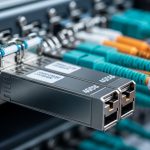
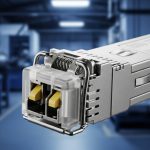
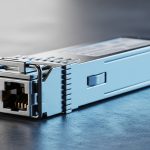
Small Form-factor Pluggable, or SFP, is a hot-swappable transceiver used in fiber optic networks to convert electrical signals into optical signals and vice versa. Its compact design allows for flexible deployment in switches, routers, and network devices, which is particularly valuable in studio environments or remote shoots where stable, fast connectivity matters. In practice, SFPs carry data at speeds from 100 Mbps to 10 Gbps, with newer iterations supporting 25 Gbps and beyond. The modular nature means you can swap transceivers without powering down equipment, minimizing downtime during shoots or on-location setups.
LC vs SC connectors: fundamental differences
When pairing SFP modules with fiber cables, the connector type becomes a deciding factor for performance, durability, and installation workflow. Two of the most common fiber connectors you’ll encounter are LC and SC. Here’s a practical snapshot based on field experience:
- LC connector: Small, compact, with a 1.25 mm ferrule. LC connectors are widely used in modern data centers and edge deployments because they save space and support high-density cabling. They typically use a push-pull or simple latch mechanism, which makes training and routine swapping straightforward. In tight rigs or portable studios, LC helps reduce cable footprint and cable management complexity.
- SC connector: A bit larger with a 2.5 mm ferrule. SC connectors are known for robustness and a locking push-pull design. They are common in legacy installations and some longer-haul links where legacy compatibility or specific equipment compatibility dictates their use. The larger size can be easier to handle with gloved hands in some field scenarios, but they take more space in high-density environments.
In terms of optical performance, LC and SC connectors are designed to meet the same standard when mated with appropriate fibers. The key factors that influence link quality are fiber type (single-mode vs multimode), connector cleanliness, polish quality, and proper installation practices. A well-cleaned LC or SC connection can achieve very low insertion loss, typically under 0.5 dB per mate in controlled settings. For photographers managing large media transfers or high-bandwidth data streams from cameras or servers, maintaining clean, secure connections minimizes signal degradation during critical operations.
Choosing the right SFP module for your setup
The decision triangle for SFP selection includes speed, distance, fiber type, and connector compatibility. Below is a practical framework I use when planning a network for post-production facilities, on-site shoots, or remote data transfers:
- Speed and distance:
- 100 Mbps to 1 Gbps: SFPs with multimode fiber typically suffice for basic control networks and monitoring streams.
- 2 Gbps to 10 Gbps: SFP+ variants and multimode or single-mode fiber types become important for high-volume data transfer, such as large raw video files.
- 25 Gbps and above: For cutting-edge storage fabrics or high-speed interconnects, consider higher-density modules and precise fiber specifications.
- Fiber type:
- Single-mode fiber is ideal for long distances with low attenuation; SC or LC can be used depending on the device and the fiber patching plan.
- Multimode fiber works well for shorter distances and cost-effective setups; often paired with LC connectors in modern gear.
- Connector ecosystem:
- LC: Best for high-density environments, newer devices, and easier swapping.
- SC: Strong compatibility with legacy installations and some robust field connectors.
- Physical environment:
- On-location shoots, studios, or mobile rigs demand ruggedness and a compact footprint; LC tends to win on density and portability.
- Controlled data rooms or legacy networks may benefit from SC-based setups if existing infrastructure dictates it.
As a practical note, always confirm the polarity (straight-through vs cross) and the compatibility matrix between the SFP module, the switch/router, and the fiber patch cables. Mismatches can cause performance drops or link failures that waste valuable production time. I keep a tiny reference chart in my studio bag that maps device model to compatible SFP types and connector families, which helps during quick deployments.
Installation best practices for LC and SC with SFP
Quality installation translates directly into reliability. Here are field-tested steps to ensure clean, stable connections:
- Inspect and clean:
- Use a fiber optic cleaning kit to wipe the ferrule end-faces before mating. A single speck of dust can cause significant insertion loss.
- Inspect connectors with a handheld magnifier to verify no scratches or chips are present.
- Match pairs carefully:
- When using LC or SC pairs, ensure that the transmitter and receiver sides are using the same connector type and fiber type for optimal performance.
- Secure the cabling:
- Utilize proper strain relief and bend radius guidance. Micro-bends in multimode cables can dramatically reduce signal integrity.
- Label cables for quick troubleshooting during shoots or editing workflows.
- Test and verify:
- Run a link test using a certified optical tester to confirm insertion loss, return loss, and proper link margin.
- Document results for future reference and audits.
Trade-offs: swapping LC for SC or vice versa
In some projects, you may need to adapt a network to existing infrastructure. Here are the practical trade-offs to consider:
- Density vs ruggedness:
- LC typically offers higher density and easier patching in modern equipment, which is beneficial in compact studios with many connections.
- SC offers robustness and legacy compatibility, which can simplify maintenance in older installations but at the expense of space.
- Cost considerations:
- LC components and fiber assemblies often have a pricing edge in new deployments due to mass adoption.
- SC components may be cost-effective in legacy systems, but compatibility should be validated to avoid hidden upgrade costs.
Real-world examples and scenarios
During a recent remote production shoot, I needed a reliable 10 Gbps uplink between a portable NAS and an edge switch. The setup used single-mode fiber with LC connectors due to the compact form factor and the high-density patch panel on the equipment rack. The pre-event testing ensured that the link could handle large 4K RAW transfers without dropouts. In another studio project, a legacy server room relied on SC connectors to maintain compatibility with older switches. While the link performed well, the physical footprint required careful cable management to prevent accidental disconnections in a busy environment.
Maintenance and lifecycle considerations
Fiber networks are designed for longevity, but they require ongoing care. Here’s what I routinely check:
- Connector cleanliness: Schedule regular wipe-downs and inspections, especially after relocations or equipment moves.
- Patch cable health: Replace fiber patch cords if the outer jacket shows wear or if there are repeated connection issues.
- Transceiver compatibility: Keep an up-to-date inventory of supported SFPs by device model to avoid compatibility surprises during upgrades.
- Documentation: Maintain simple diagrams showing which LC or SC links connect which devices, including fiber types and link budgets.
FAQ: LC vs SC connectors in SFP networks
- What does LC stand for in fiber optics? LC stands for Lucent Connector, featuring a small 1.25 mm ferrule and a compact design ideal for high-density deployments. It is widely adopted in modern data centers and network gear.
- Are LC and SC compatible with all SFP modules? Not automatically. SFP modules must match the fiber type and connector; many devices support both, but you may need adapters or patch panels that align with the connector family and fiber specifications.
- Which is better for travel-friendly setups, LC or SC? LC generally wins for portability and density, making it preferable for mobile studios and remote shoots where space is at a premium.
- How can I ensure low insertion loss? Clean connectors properly, use matched fiber types, and verify with a test tool after installation to confirm a healthy link margin.
In summary, the Small Form-factor Pluggable ecosystem gives you modularity and flexibility, while the choice between LC and SC connectors shapes how you manage space, durability, and upgrades. By aligning speed, distance, fiber type, and environment with the right connector family, you can build network links that stay reliable under the demanding conditions of production work. Remember: meticulous preparation and routine maintenance are as essential as the gear itself.
Image prompts for visual understanding
Author notes and sources
As a photographer and technical practitioner, I rely on credible specifications and field-tested practices. For precise standards and terminology, consult official documentation from standards bodies and manufacturers. This article integrates practical knowledge with references to industry norms to help ensure safe, effective deployments.
Disclaimer: This guide is intended for informational purposes and should not substitute professional network design consultation. Always verify compatibility with device vendors and follow local safety guidelines. Update date: 2024-11-01.
Conclusion
Choosing between LC and SC connectors for SFP deployments comes down to density needs, legacy compatibility, and the working environment. By focusing on high-quality fiber, clean installation practices, and thorough testing, you can maximize link reliability and performance in both studio and field settings. Stay curious, experiment with configurations, and document your setups to accelerate future projects.
Additional resources
- For fiber connector standards and best practices, consult official guides from reputable organizations such as the IEEE and IEC. IEEE Standards
- Video overview of SFP modules and connectors:
- Related article: LC vs SC Connectors: Choosing the Right Fiber Connector for SFP — LC vs SC Connectors
Author bio: I am a professional photographer with hands-on experience in building reliable data workflows for media production. My practice combines fast, precise image capture with robust data handling, ensuring that both creative and technical workflows stay in sync. I share practical tips on composition, lighting, gear, and post-processing, with an emphasis on reliability and efficiency.