
Border security and customs networks have one job: move data reliably across long distances while meeting strict uptime expectations. This article helps network engineers and field teams choose the right border security fiber SFP for WAN backhaul, site aggregation, and secure connectivity between control rooms and inspection locations. You will get a practical top list, real deployment numbers, a selection checklist, and troubleshooting patterns seen in the field.
10G SR (850 nm) multimode SFP+: best for metro and campus trunks
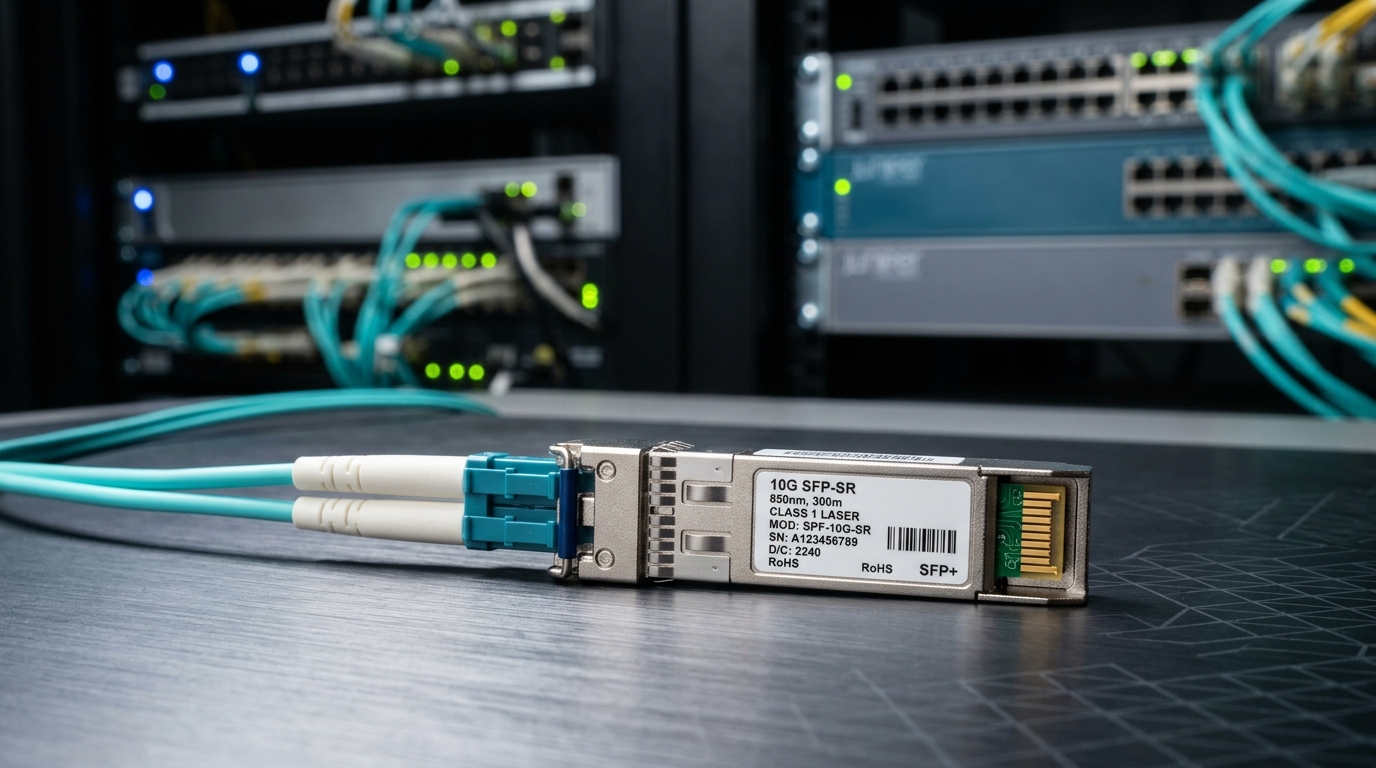
If your customs sites sit within a few hundred meters to a couple of kilometers, a 10G SR SFP+ is often the simplest way to light up OM3 or OM4 fiber. Typical examples include Cisco-compatible optics such as Cisco SFP-10G-SR and third-party modules like Finisar FTLX8571D3BCL or FS.com SFP-10GSR-85. These are short-reach optics that rely on multimode modal bandwidth, so the fiber plant quality matters.
Key specs to verify include wavelength around 850 nm, reach for SR classes (often 300 m on OM3 and 400 m on OM4 for 10G SR), and the connector type (usually LC). For border deployments, confirm the switch supports SFP+ (not SFP) and that the optics are validated by the vendor for your model.
Best-fit scenario: a customs operations campus where 48-port ToR switches aggregate cameras and sensors, and the fiber runs are short between buildings.
- Pros: lowest cost per port, abundant multimode infrastructure, easy upgrade path to 10G.
- Cons: limited reach versus single-mode; performance depends on OM3/OM4 and patch cord quality.
10G LR (1310 nm) single-mode SFP+: best for site-to-site spans
For longer links between inspection sites and regional aggregation points, 10G LR SFP+ is a common middle ground. It uses 1310 nm single-mode fiber and typically targets up to 10 km depending on the SFP class and link budget. In border networks, this is frequently used to connect a small remote outpost to a nearby communications hut.
Key specs/details: wavelength 1310 nm, reach class 10 km, LC connector, and a temperature range compatible with outdoor cabinets (often 0 to 70 C for standard and -40 to 85 C for extended options). If you use long-haul budget planning, include patch cord losses, splices, and any inline attenuators required for safety or power control.
Best-fit scenario: a 10 km single-mode run from a vehicle inspection zone to a roadside cabinet with an aggregation switch and secure firewall uplinks.
- Pros: strong reach for the price, stable with single-mode, widely supported by enterprise switches.
- Cons: higher cost than SR; requires single-mode cabling and careful cleaning of LC endfaces.
1G LX (1310 nm) SFP: cost-effective for legacy sensors and slower control planes
Some border security devices still speak 1G Ethernet for control, telemetry, and legacy camera management. A 1G LX SFP at 1310 nm can reduce port cost and power while extending reach over single-mode fiber. These modules are also helpful when you need to standardize optics across a mixed fleet without forcing a full 10G uplink redesign.
Key specs to check: reach class typically 10 km (varies by vendor), LC connector, and whether the switch uses standard SFP electrical interfaces rather than SFP+ or proprietary variants. For deployments that include outdoor cabinets, prioritize extended temperature models and confirm optical power levels stay within the receiver sensitivity limits stated in the datasheet.
Best-fit scenario: a control plane where barrier gate controllers and environmental sensors aggregate into an access switch, then uplink to a regional router over single-mode.
- Pros: low power and low cost, ideal for legacy and mixed-speed networks.
- Cons: not suited for high-bandwidth video backhaul; may create bottlenecks if you later consolidate streams.
2G/4G SFP variants for special cases: when you must match older MSA behavior
Not every customs network is built on modern 10G-ready hardware. Some deployments rely on older transport gear or proprietary line cards that expect specific optical behavior. While 2G and 4G-era SFP optics are less common today, field experience shows they still appear in retrofits for remote communications huts, especially where you cannot replace the entire switch chassis quickly.
Selection details: validate the exact interface type (SFP vs mini-GBIC), confirm compatibility with the switch firmware, and request the vendor’s compatibility matrix. If you use third-party optics, ensure they implement the correct Digital Optical Monitoring (DOM) fields and that the switch recognizes them without disabling the port.
Best-fit scenario: a phased modernization where only edge switches are updated, while older aggregation switches remain in service.
- Pros: enables upgrades without ripping out existing hardware.
- Cons: compatibility risk is higher; you may spend time on firmware validation and DOM quirks.
Extended temperature border-ready optics: protect uptime in outdoor cabinets
Border security sites often place switches in hardened enclosures exposed to sun load, winter cold, and temperature cycling. Standard optics may pass lab tests but fail reliability targets after months due to thermal stress on laser bias current and receiver components. Selecting extended temperature border security fiber SFP options (commonly -40 to 85 C) can reduce field truck rolls.
Key specs/details: confirm the operating temperature range, verify laser safety and optical power compliance for your receiver, and look for robust mechanical tolerances. Also confirm the enclosure supports adequate airflow or uses thermal design that prevents hot spots at the module cage.
Best-fit scenario: a roadside cabinet with a managed switch near a microwave link, where summer temperatures spike and repeated power cycles occur during storm events.
- Pros: fewer temperature-related port flaps, better long-term stability.
- Cons: slightly higher module cost; still requires correct thermal design at the enclosure level.
DOM-capable SFP with alarms: reduce mean time to repair (MTTR)
In customs networks, you want early warning when a link degrades due to connector contamination, fiber microbends, or aging optics. DOM-capable SFPs expose real-time telemetry such as laser bias current, received power, and module temperature through the switch management plane. This is especially valuable in remote border locations where on-site troubleshooting is limited.
What to verify: DOM support (usually via MSA registers), whether your switch polls DOM reliably, and how alarms appear in your monitoring system. Many engineers align thresholds with operational baselines: for example, set a warning at a received power drop of 3 dB from normal and a critical alarm at 6 dB, then correlate with maintenance logs.
Best-fit scenario: a network operations center monitoring dozens of uplinks from inspection zones; you want to catch a failing module before users report packet loss.
- Pros: faster isolation, measurable improvements in MTTR, better planning for spares.
- Cons: telemetry does not replace inspection; you still must clean and re-terminate when needed.
High-quality single-mode optics with clean installation: protect links over years
Single-mode SFPs for border security fiber SFP deployments depend heavily on physical layer discipline. Even if the optics are rated for 10 km or more, contaminated LC connectors can cause excessive loss and receiver errors. In field work, we often see failures after maintenance crews reuse patch cords, swap jumpers during cabinet upgrades, or overlook dust caps.
Key specs/details: choose modules with stable output power and verify receiver sensitivity in the datasheet; then pair with a proven cleaning procedure and inspection tools. Follow industry guidance around connector cleanliness and fiber handling, and consider using torque-limited LC adapters in racks to prevent stress.
Best-fit scenario: a multi-year border link between a central command node and a regional aggregation switch where maintenance windows are rare.
- Pros: reliable performance when combined with disciplined fiber hygiene.
- Cons: performance can degrade quickly with dirty connectors; optics cannot compensate for bad installs.
Match SFP speed and switch behavior: avoid “works on bench, fails in production”
Even when the wavelength and reach look correct, switch behavior can still break the link. Some platforms enforce strict SFP compatibility, especially with DOM and vendor ID checks. Before you roll out optics across border sites, validate the exact switch model, firmware version, and whether the port defaults to a safe mode when an “unknown” optic is inserted.
Key specs/details: confirm the transceiver electrical interface matches the switch expectation (SFP vs SFP+), check if the platform supports DOM and whether it logs warnings for non-vendor optics, and verify that the optics are rated for the switch’s required power class. If you standardize on a single vendor across sites, you reduce operational uncertainty.
Best-fit scenario: a multi-vendor customs network where procurement must standardize quickly without causing operational disruptions.
- Pros: fewer surprises, smoother deployments, easier spares management.
- Cons: increased procurement discipline; you may pay a premium to reduce compatibility risk.
Top comparison: border security fiber SFP options by distance, type, and operating needs
Use this table to quickly map optics to typical customs network distances and environmental constraints. Always confirm exact reach with the vendor datasheet plus your link budget (fiber attenuation, splice loss, connector loss, and safety margins).
| Option (typical class) | Wavelength | Target reach | Fiber type | Connector | Data rate | Operating temperature | Where it fits in border networks |
|---|---|---|---|---|---|---|---|
| 10G SR SFP+ | 850 nm | ~300 m (OM3) / ~400 m (OM4) | Multimode OM3/OM4 | LC | 10G | 0 to 70 C or extended | Campus trunks, camera aggregation |
| 10G LR SFP+ | 1310 nm | up to ~10 km | Single-mode | LC | 10G | 0 to 70 C or extended | Site-to-site backhaul |
| 1G LX SFP | 1310 nm | often ~10 km | Single-mode | LC | 1G | 0 to 70 C or extended | Legacy control and telemetry uplinks |
| Extended-temp SFP (any class) | Depends on class | Depends on class | Depends on class | LC | Depends on class | -40 to 85 C (typical extended) | Outdoor cabinets and harsh climates |
Selection criteria checklist for border security fiber SFP procurement
When engineers choose optics for border security and customs networks, they usually work through these factors in order. This sequence reduces rework and avoids the most expensive failure mode: deploying optics that pass a bench test but do not meet operational constraints.
- Distance and fiber type: confirm OM3 vs OM4 vs single-mode, and measure end-to-end loss including splices and patch cords.
- Switch compatibility: verify SFP vs SFP+, supported speed grades, and firmware behavior with third-party optics.
- DOM support and monitoring: ensure the switch can read DOM and your NMS can alert on received power and temperature trends.
- Operating temperature: prioritize extended temperature models for outdoor cabinets; validate enclosure thermal design.
- Budget and TCO: compare OEM vs third-party pricing, but include failure rates, spares logistics, and truck-roll costs.
- Vendor lock-in risk: standardize part numbers where possible and keep a controlled compatibility matrix for replacements.
Pro Tip: Before you blame the optics, inspect and clean the LC ends and re-measure link loss after any field maintenance. In real deployments, a dirty connector can mimic a failing SFP by driving received power below sensitivity, and DOM will often show a gradual drift that looks like aging but is actually contamination.
Common mistakes and troubleshooting tips (seen in border deployments)
These are frequent failure modes that cost time and downtime. Each includes a likely root cause and a practical fix.
- Mistake 1: Choosing SR for a single-mode run. Root cause: multimode optics connected to single-mode fiber (or vice versa) can cause severe loss and link flaps. Solution: verify fiber type at the patch panel labels and confirm with OTDR or tester results; then swap to the correct wavelength and reach class.
- Mistake 2: Ignoring connector cleanliness after re-cabling. Root cause: dust on LC endfaces increases insertion loss and can push the receiver into error-heavy operation. Solution: clean with approved fiber methods, inspect with a scope, then re-check link counters and DOM received power.
- Mistake 3: Assuming “it works once” means it is stable in temperature cycles. Root cause: standard-temperature optics may fail under outdoor thermal extremes. Solution: use extended temperature optics when cabinets experience wide day-night swings; verify enclosure airflow and avoid hot spots near the transceiver cage.
- Mistake 4: Third-party optics not recognized by the switch. Root cause: strict platform checks for vendor ID or DOM implementation differences lead to port disable or intermittent link. Solution: validate with your exact switch model and firmware; maintain a compatibility list and test at least one unit per batch.
Cost and ROI note for optics in customs networks
Typical street pricing varies by speed and reach, but ballparks are useful for planning. A 1G LX SFP often costs less than a 10G LR SFP+; 10G SR SFP+ is usually cheaper than LR but depends on whether you already have OM3/OM4. OEM optics can cost roughly 1.2x to 2.5x third-party pricing, yet third-party can still be cost-effective if compatibility and failure rates are controlled.
ROI typically comes from reduced truck rolls and fewer hours of downtime. If a remote border site outage costs a security operations team even 2 to 4 hours of impact during peak inspection periods, the savings from proactive DOM monitoring and correct extended-temperature selection can outweigh small per-port price differences. For standards and interoperability expectations, review IEEE 802.3 for Ethernet PHY behavior and consult vendor datasheets for DOM and optical safety compliance. anchor-text: IEEE 802.3 standard anchor-text: Finisar optics datasheets
