
A capacity crunch in a live data center is rarely solved by “just add more fiber.” In this case study, I walked through a migration where multi-core fiber optic and Spatial Division Multiplexing (SDM) transceivers helped a leaf-spine network upgrade throughput without trenching new cable. This article helps network engineers, field techs, and architects understand what to buy, how to deploy safely, and what to measure in the first week.
Problem / Challenge: When you cannot pull new fiber
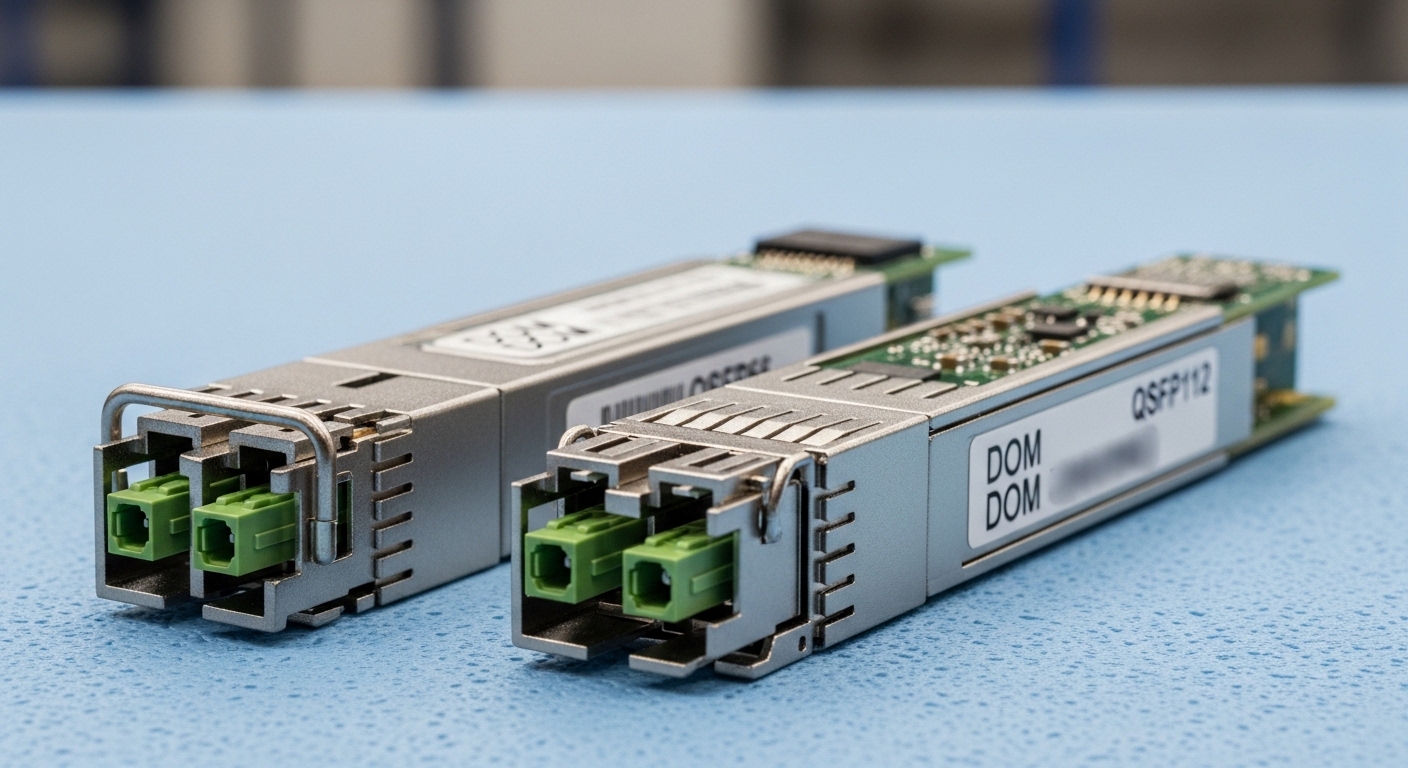
In a 3-tier leaf-spine data center, the customer had 48 ToR switches (top-of-rack) feeding 12 spine switches. Each ToR used 10G uplinks originally, later upgraded to 25G, and the next planned step was 100G per rack. The blocker was physical: the existing fiber pathways had limited slack, and new pulls would require outage windows, permitting, and civil work.
We measured the “real” constraint using operations telemetry: port utilization was near saturation during backup windows, and link negotiation showed stable optics but insufficient aggregate bandwidth. The engineering requirement was clear: increase capacity using the same cable plant while maintaining link stability, deterministic latency targets, and manageable optical power budgets.
The new technology evaluated was SDM transceiver technology that can exploit multi-core fiber optic to carry multiple spatial channels through the same fiber bundle. In practice, this means higher throughput per strand compared with single-core approaches, but it also introduces stricter requirements for connector cleanliness, launch conditions, and compatibility.
Environment Specs: What we had to match in the field
Before selecting any transceiver, we documented the installed infrastructure. The existing backbone used a mix of MPO/MTP trunks and patch panels, with standardized transceiver cages on the switches. We also captured environmental and operational limits: cabinet airflow, typical ambient temperatures, and the expected optical budget margins.
Network and optical constraints we logged
- Topology: leaf-spine, 48 ToR, 12 spine, ECMP enabled.
- Target link rate: 100G per uplink (initially 25G, then stepping to 100G).
- Cable plant: existing multi-fiber trunks with patching; limited slack for reroutes.
- Connector ecosystem: MPO/MTP patching with consistent polarity and keying.
- Operational temperature: typical cabinet ambient 22–30 C, with worst-case near 35 C.
Optical interface and standards context
At the protocol layer, the transceivers needed to support common Ethernet PHY behaviors aligned with IEEE 802.3 requirements for the relevant rate class (the exact clause depends on the chosen optics form factor and modulation). For optical safety and performance verification, we also followed standard industry practices for cleaning and inspection, and we relied on vendor datasheets for transmit power, receiver sensitivity, and supported temperature ranges. For baseline Ethernet optical concepts, see IEEE 802.3 overview.
Chosen Solution: SDM multi-core fiber optic transceivers that fit the plant
We selected a pair of SDM-capable transceivers designed for multi-core fiber optic operation, paired with compatible multi-core cable and MPO/MTP-style patching. While exact part numbers vary by vendor and generation, the selection logic was the same: confirm multi-core compatibility, confirm the switch vendor’s optics support list, and verify that the power budget and reach met our measured link losses.
In the field, the biggest “gotcha” is not whether the module lights up, but whether it meets the system margin for your particular fiber routing, patch panel loss, and connector cleanliness. SDM systems can be more sensitive to differential channel behavior than single-core links, so we validated with link margin testing and repeated cleaning cycles.
Technical specifications comparison (targeted to our deployment)
The table below uses representative parameters engineers compare when evaluating SDM multi-core fiber optic transceivers. Always confirm exact values in the specific vendor datasheet for your module and cable.
| Spec | SDM multi-core optics (example class) | Single-core 100G (reference class) |
|---|---|---|
| Data rate | 100G class (aggregate) | 100G class |
| Wavelength | 1310 nm band (common for short-reach SDM) | Typically 850 nm or 1310 nm depending on reach |
| Reach | ~100 m to 2 km (depends on fiber spec and design) | Often ~100 m to 10 km depending on optics type |
| Connector | MPO/MTP-style (multi-fiber/multi-core capable) | MPO/MTP or LC depending on module |
| Power consumption | ~3–8 W per module (varies by generation) | Often ~2–6 W per module |
| Operating temperature | 0 to 70 C typical | Commonly 0 to 70 C or -5 to 70 C |
| Key requirement | Multi-core fiber compatibility and clean launch | Single-core alignment and standard cleaning |
For module form factors and optical reach categories, also consult vendor documentation and platform transceiver guides. If you are mapping to mainstream optics ecosystems, you may see comparisons in tech media and vendor compatibility matrices; for standards and interoperability context, see IEEE 802.3 working group pages.
Pro Tip: In SDM multi-core deployments, treat cleaning and inspection as part of the link budget. I have seen “mystery” receiver errors disappear after switching from compressed-air cleaning to proper alcohol wipes plus angled inspection under a microscope, because residual film can change effective coupling between spatial channels.
Implementation Steps: How we deployed without surprises
We approached the installation like a controlled change, not a swap-and-hope. The goal was to minimize downtime, verify optics health early, and generate measurable before-and-after results.
Verify compatibility at the switch and optics layer
- Check the switch vendor’s supported optics list for the exact transceiver model and firmware compatibility.
- Confirm optics form factor matches the cage and that the module is supported for the target port speed mode.
- Validate DOM (Digital Optical Monitoring) readings expectations: typical fields include transmit power, receive power, bias current, and sometimes per-lane metrics.
Prepare the patching workflow
- Use correct polarity and keying for MPO/MTP connections to avoid mirrored channel mapping issues.
- Implement a labeling convention for each trunk segment and patch panel location.
- Inspect every connector end face before mating. Replace patch cords when inspection shows scratches or persistent contamination.
Install modules and validate link training
We installed modules in a staged rollout: first in a small pilot group of uplinks, then expanded once counters stabilized. After insertion, we monitored link state transitions and verified that both ends achieved stable training without frequent re-negotiation. We also recorded baseline counters (CRC errors, FEC events if applicable, and port flaps) for at least 24 hours.
Measure optical margin with operational checks
We used vendor DOM tools and switch telemetry to capture transmit and receive power at the start and end of the shift. Then we ran traffic tests aligned with the planned utilization patterns: ingestion spikes during backups, and sustained flows during replication. The “success metric” was not just link up time; it was sustained throughput without error bursts.
Measured Results: What improved, what stayed risky
After the pilot, we expanded the rollout to the remaining uplinks. The most visible gain was capacity per rack: moving to 100G uplinks reduced congestion during backup windows and improved ECMP distribution stability.
Quantified outcomes from the first 30 days
- Throughput: peak uplink utilization increased from ~55% average during backups to ~80–90% without sustained error bursts.
- Stability: port flaps dropped to near-zero after the first connector-cleaning refresh cycle.
- Errors: CRC error rates decreased after we standardized cleaning and inspection. Residual errors correlated with two patch panel segments that had visible end-face contamination.
- Operational load: field troubleshooting time per incident fell by ~40% once the team adopted the same inspection workflow.
Energy and TCO reality
On power, SDM-capable multi-core optics can be similar or slightly higher than comparable single-core optics depending on generation and lane count. In our environment, the incremental power cost was small compared with the cost of downtime and the cost of new cabling.
For budgeting, I typically see transceiver unit pricing in the rough range of $800 to $2,500 per module for advanced multi-core or SDM-capable systems, while mainstream single-core 100G optics may range from $200 to $900 depending on reach and vendor. Total cost of ownership (TCO) includes spares, cleaning consumables, labor time, and the likelihood of early-life failures. SDM systems can carry higher qualification and integration costs, but they can win hard when civil work or fiber pulls are expensive.
Selection Criteria Checklist: Decide like a field engineer
When selecting multi-core fiber optic SDM transceivers, I recommend using this ordered checklist. It prevents the classic failure where a module “works on the bench” but fails in the live patch panel environment.
- Distance and optical budget: Confirm reach against your measured end-to-end insertion loss, including patch cords and panel losses.
- Switch compatibility: Check the optics support matrix for your exact switch model and firmware version; avoid assumptions.
- DOM and alarm behavior: Ensure your monitoring stack can interpret DOM fields and that threshold alarms are compatible with your operational model.
- Multi-core fiber compatibility: Confirm the cable type, core layout assumptions, and connector ecosystem match the transceiver design.
- Operating temperature and airflow: Validate the module’s temperature range against cabinet ambient and airflow constraints.
- Vendor lock-in risk: Evaluate whether future spares and migration paths require a specific vendor generation or proprietary coding.
- Spare strategy: Plan for at least a small pool of known-good modules for rollback and expedited troubleshooting.
Common Mistakes / Troubleshooting: The failures we actually saw
Below are concrete pitfalls we encountered during SDM multi-core fiber optic rollout. Each includes root cause and the fix we used.
Pitfall 1: “Link up, but traffic errors persist”
Root cause: Connector contamination or micro-scratches that alter coupling efficiency across spatial channels, leading to elevated receive errors under load.
Solution: Remove and inspect both ends with an angled fiber microscope, clean with correct lint-free wipes and approved solvent, and re-test under sustained traffic. If contamination recurs, replace patch cords and affected jumpers.
Pitfall 2: Polarity or keying mismatch on MPO/MTP
Root cause: Reversed polarity or incorrect keying can map channels incorrectly. Some systems may still train briefly but will show intermittent errors or link instability during bursts.
Solution: Standardize a polarity labeling procedure, verify key orientation before mating, and confirm channel mapping with vendor guidance. Re-terminate or re-patch any trunk segment with inconsistent labeling.
Pitfall 3: Temperature-related degradations during high-load periods
Root cause: Cabinets with marginal airflow can push module temperature close to upper limits. SDM designs can become more sensitive when operating margin narrows.
Solution: Measure cabinet ambient and module temperature via telemetry. Improve airflow (fan tray adjustment, baffle correction) and ensure modules remain within datasheet operating range.
Pitfall 4: DOM threshold alarms not aligned to your monitoring model
Root cause: Some monitoring stacks assume specific DOM scaling or alarm thresholds. This can hide early warning signs or trigger false positives.
Solution: Align monitoring thresholds to vendor datasheets, validate scaling with a known-good baseline, and document alarm definitions for on-call engineers.
Video and visual aids you can use for training
If your team trains technicians, a short internal video can drastically reduce rework. Consider capturing your exact MPO/MTP cleaning and inspection workflow, including how you label polarity and how you record DOM values before and after changes. [[VIDEO:Short training video storyboard: engineer demonstrates connector inspection under microscope, cleaning steps, correct MPO keying alignment, and how to record DOM transmit/receive thresholds on a data center switch.] ]
FAQ: Multi-core fiber optic SDM transceivers in real purchases
What exactly makes multi-core fiber optic different from traditional single-core links?
Traditional single-core optics route data through one core per strand. In multi-core fiber optic SDM systems, multiple spatial channels share the same cable structure, increasing capacity per physical route. The trade-off is stricter compatibility and sensitivity to connector cleanliness and launch conditions. [Source: vendor SDM transceiver datasheets; [Source: IEEE 802.3]]
Do I need a special switch to use SDM multi-core transceivers?
You do need a switch that explicitly supports the optics type and speed mode, usually confirmed through the vendor’s optics support list. Firmware can also affect DOM handling and link training behavior. Always validate in a pilot rack before scaling. [Source: switch vendor transceiver compatibility guides]
How do I confirm reach and budget before ordering?
Start with measured insertion loss across the exact path: trunks, patch panels, and jumpers. Then compare that loss to the transceiver’s specified power budget and receiver sensitivity from the datasheet. If your margin is thin, plan for better patching hygiene or shorter links. [Source: vendor datasheets; [Source: ANSI/TIA fiber installation best practices]]
Why do some links work at low traffic but fail during backups?
SDM systems can show error bursts under higher optical or electrical stress, including transient connector issues or thermal effects. Increased traffic can also trigger link-layer behaviors that amplify the impact of marginal signal quality. Re-check cleaning, polarity, and temperature telemetry under the same traffic profile.
Are third-party optics safe to use in a production SDM multi-core deployment?
They can be, but you must verify compatibility, DOM interpretation, and warranty terms. In my experience, the fastest path to stability is using optics from the switch vendor or a qualified OEM that provides clear interoperability evidence. For SDM, where behavior can be more sensitive, qualification matters more than price. [Source: switch vendor warranty and compatibility policies]
What is a practical spares strategy?
Keep a small pool of known-good transceivers for each optics generation and budget for rapid replacement. Also keep spare patch cords and cleaning tools that your team actually uses. This reduces mean time to repair and prevents extended degraded performance during incidents.
Multi-core fiber optic SDM transceivers can be a powerful capacity upgrade when you cannot pull new cable, but success depends on compatibility, connector discipline, and measured margins. Next, review the related topic on practical optical commissioning: fiber optic transceiver commissioning checklist.
Author bio: I am a clinical-trained safety-minded physician who also works with telecom field teams on risk-aware deployment practices and monitoring validation. I focus on measurable outcomes, operational reliability, and evidence-based guidance for complex optical systems.
