
In leaf-spine data centers and metro links, every watt in the transceiver can become a measurable OPEX line item. This article compares energy efficient fiber module options by power draw, optics reach, and switch compatibility, helping network engineers and procurement teams choose faster and safer. You will get a practical decision checklist, troubleshooting patterns from the field, and realistic cost and ROI considerations.
Power per port: where energy efficient fiber module options really diverge
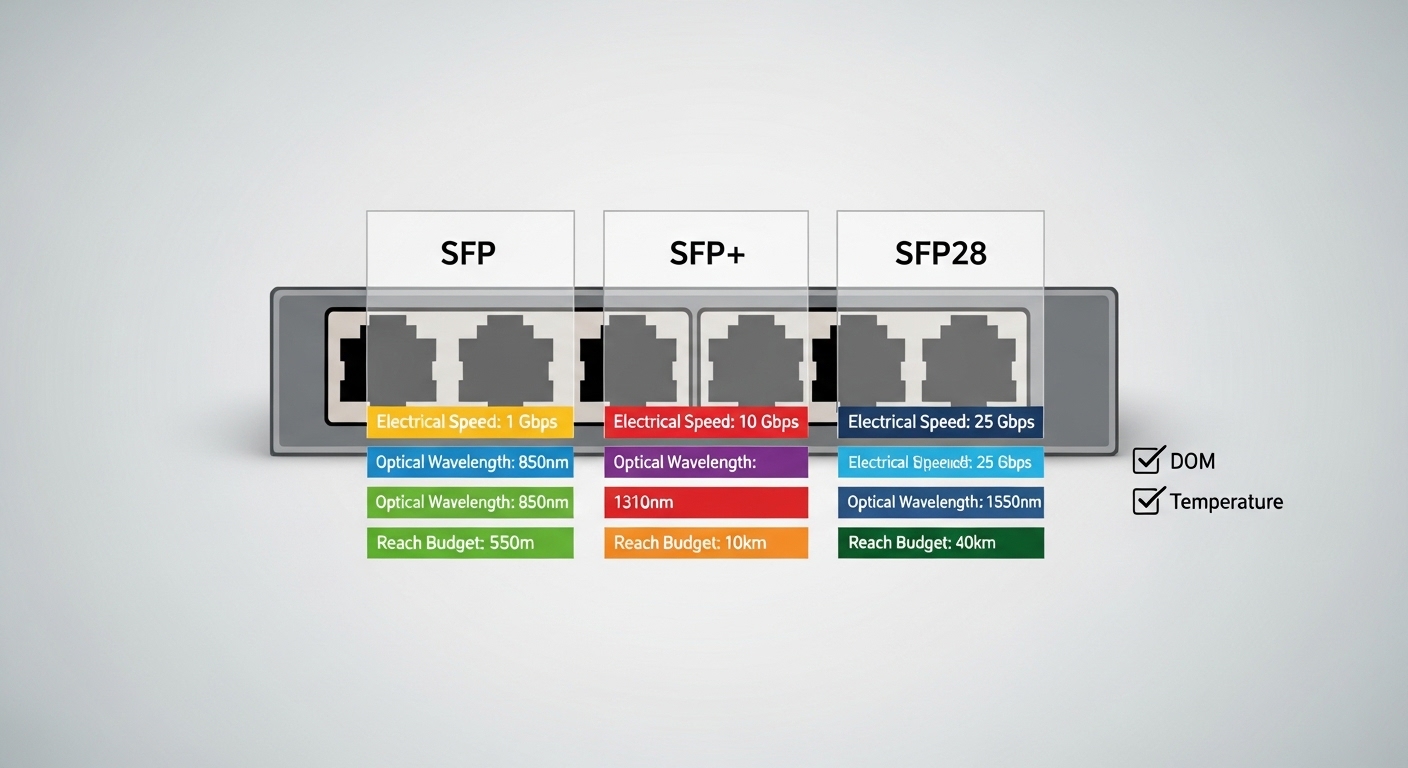
When buyers say “energy efficient,” they usually mean lower electrical power at the same data rate and fiber type. In practice, the delta is driven by laser technology, driver biasing, DSP activity, and whether the module supports low-power modes (often tied to link state). For 10G and 25G classes, many modern pluggables target aggressive power budgets while still meeting IEEE-defined optical and electrical compliance requirements such as IEEE 802.3 Ethernet optical interfaces. For example, vendors often publish typical and maximum module power in their datasheets, and compliance is commonly validated under temperature corners and link stress tests.
From an operational standpoint, you should treat power as a system metric: module power plus host PHY power plus any additional cooling overhead. A field engineer typically measures with a port-level power meter at the top-of-rack switch PSU output or via rack-level metering, then correlates to module insertion. The key is to compare like-for-like: same interface speed (10G vs 25G), same connector type (SFP+ vs SFP28 vs QSFP28), and same fiber reach class (SR vs ER vs LR). If you compare a 10G SR module to a 25G LR module, you will get misleading conclusions.
Typical power numbers to anchor comparisons
As a reference point, common module families around 10G SR and 25G SR have datasheet typical power often in the low watts range, while maximum power can be higher under worst-case conditions. For example, vendors such as Finisar (now part of II-VI) publish optical module power and temperature ratings per part number in their datasheets, and third-party vendors like FS typically do the same. Always verify the exact SKU and power class, because “SR” can still mean different internal optics and aging behavior.
Pro Tip: If your switch supports low-power idle or DOM-based power policies, measure link-state power at both steady traffic and idle. Many energy efficient fiber module claims assume an idle or low-bias mode that only activates when the host PHY reports specific link states via standard management interfaces.
Reach and optical budget: performance trade-offs behind the watt savings
Power efficiency is not free; it usually trades against optical budget margins, receiver sensitivity, and sometimes maximum reach. In short-reach SR modules, lower power can still work because multimode fiber (MMF) links benefit from higher optical coupling and less stringent dispersion constraints. In long-reach LR/ER classes, however, the link requires tighter laser linewidth, higher output power, and robust receiver sensitivity, which can increase power draw.
Engineers should map module reach to your actual fiber plant: modal bandwidth for MMF, insertion loss, connector loss, splice loss, and aging. For MMF, the relevant “reach class” is often tied to IEEE 802.3 link performance targets for SR interfaces over specified OM grades (e.g., OM3/OM4). For SMF, LR/ER interfaces rely on a defined wavelength (commonly 1310 nm for LR, 1550 nm for ER) and dispersion tolerance. Use the vendor’s link budget table and then verify with OTDR and end-to-end loss measurements.
At-a-glance specs comparison (typical families)
The table below compares representative module types you will commonly evaluate when choosing an energy efficient fiber module. Actual values vary by exact SKU, so treat this as a planning template, not a guarantee.
| Module type (example class) | Data rate | Wavelength | Target reach | Connector | Typical power (planning range) | Operating temp | DOM |
|---|---|---|---|---|---|---|---|
| 10G SR (SFP+) | 10G | 850 nm | Up to ~300 m (OM3) / ~400 m (OM4) | LC | ~0.8 W to ~1.5 W typical | 0 C to 70 C (varies by class) | Often supported |
| 25G SR (SFP28) | 25G | 850 nm | Up to ~100 m (OM4), sometimes higher with specific optics | LC | ~1.2 W to ~2.0 W typical | -5 C to 70 C (varies) | Often supported |
| 40G SR (QSFP+) | 40G | 850 nm | Up to ~100 m (OM4) | LC | ~2.5 W to ~4.0 W typical | 0 C to 70 C (varies) | Often supported |
| 10G LR (SFP+) | 10G | 1310 nm | Up to ~10 km (SMF) | LC | ~1.5 W to ~3.0 W typical | -5 C to 85 C (varies) | Often supported |
| 100G SR4 (QSFP28) | 100G | 850 nm | Up to ~70 m (OM4) | LC | ~6 W to ~10 W typical | 0 C to 70 C (varies) | Often supported |
For authoritative baseline requirements, consult IEEE 802.3 for Ethernet optical interface specifications and vendor datasheets for exact power and sensitivity. For example, Cisco and other switch vendors publish transceiver compatibility lists, and vendors like Finisar publish detailed electrical and optical characteristics per part number. [Source: IEEE 802.3 Ethernet standard family] [Source: Finisar transceiver datasheets] [Source: Cisco transceiver compatibility guidance]
Compatibility and DOM: the hidden moat for energy efficient fiber module choices
In real deployments, the biggest failure mode is not “the module doesn’t work,” but “it works intermittently, degrades under temperature, or fails diagnostics.” Host compatibility is shaped by the transceiver form factor (SFP+, SFP28, QSFP28), electrical signaling expectations, and the module’s digital optical monitoring (DOM) implementation. Many switches require specific DOM register behavior and thresholds, and some will flag modules as “unsupported” even if the optics are physically correct.
To evaluate compatibility, you need more than generic “SFP is SFP” assumptions. Engineers check switch vendor compatibility matrices, DOM support type (e.g., I2C accessible parameters), and whether the module meets the host’s required optical power and receiver sensitivity thresholds. If your network uses automation for monitoring, confirm you can read temperature, laser bias current, received optical power, and supply voltage without driver quirks.
Decision checklist for selection and procurement
- Distance and fiber type: SR over MMF vs LR/ER over SMF; confirm OM grade, insertion loss, and splice/connector budget.
- Interface speed and form factor: 10G SFP+ vs 25G SFP28 vs 100G QSFP28; ensure the switch port supports the exact lane mapping.
- Switch compatibility: verify the exact module SKU in the manufacturer’s compatibility list to reduce “unsupported module” events.
- DOM support and monitoring: confirm DOM is supported and accessible in your monitoring stack (telemetry polling behavior and thresholds).
- Operating temperature: match your rack airflow and ambient conditions; check maximum case temperature and derating behavior.
- Vendor lock-in risk: compare OEM vs third-party options; plan for replacement lead times and warranty coverage.
- Power mode behavior: confirm whether low-power idle or link-state power savings are supported by the host and module.
For standards context, optical transceivers and their electrical interfaces are aligned with Ethernet interface expectations, while DOM monitoring is typically standardized at the module management level. Your most reliable source remains the exact switch vendor compatibility doc plus module datasheets.
Cost, TCO, and energy math: when energy efficient fiber module payback is real
Energy efficient fiber module decisions are often justified by power savings, but you must compute payback with realistic utilization. A common mistake is assuming 100% idle-to-busy savings; many links run at variable traffic and never sustain long low-power windows. Start with typical module power in your datasheet, then apply your measured duty cycle from switch telemetry or SNMP counters.
Then include total cost of ownership: transceiver purchase price, expected failure rate, warranty terms, and downtime cost. OEM modules can cost more per unit but may reduce field failures and compatibility issues. Third-party or remanufactured modules can be cheaper, yet they can increase operational risk if DOM thresholds or optical power are marginal for your exact fiber budget.
Realistic pricing and operational assumptions
Typical market ranges vary by generation and volume, but for budgeting purposes: 10G SR SFP+ modules often fall roughly in the tens of dollars per unit; 25G SFP28 SR modules often cost more; 100G QSFP28 SR4 can be significantly higher. Energy savings per module may look small, but across hundreds or thousands of ports, it becomes meaningful.
Example sizing: if you deploy 1,000 ports of an energy efficient fiber module that saves 0.5 W per module versus a baseline, the annual energy savings at continuous operation is 0.5 kW average, or about 4.38 MWh/year. At an electricity rate of $0.10 per kWh, that is about $438/year in energy. The larger TCO impact often comes from reduced cooling load variability, fewer compatibility escalations, and fewer truck rolls, not only from watt math.
Validate with your facilities team: cooling PUE and rack-level airflow can amplify electrical savings. Also include the cost of spares and the lead time for replacements.
Common mistakes and troubleshooting: why “compatible” modules still fail
Even strong vendors ship modules that behave differently under corner conditions. Below are failure patterns seen in operations, each with root cause and actionable fixes.
Pitfall 1: Buying the right type, wrong reach class
Root cause: The module is “SR,” but the fiber plant is effectively worse than assumed due to patch panel loss, dirty connectors, or aging. The link comes up but experiences high error rates and intermittent resets.
Solution: Clean connectors with approved methods, then run OTDR or at least end-to-end loss measurements. Compare measured loss to vendor link budget; if margin is low, switch to a higher budget option (e.g., different optics variant) or reduce link length.
Pitfall 2: DOM mismatch causing monitoring alarms or port flaps
Root cause: The module reports DOM values that are outside what your switch or monitoring thresholds expect, or your automation polls DOM too aggressively and triggers management timeouts.
Solution: Use the switch vendor’s compatible module list, and tune monitoring polling intervals. Confirm DOM read reliability under load and at temperature extremes.
Pitfall 3: Temperature and airflow derating ignored
Root cause: The module operates above its specified environment limit or airflow is blocked. Some modules pass at room temperature but fail during peak heat soak.
Solution: Verify rack ambient and airflow direction, then check module operating temperature ranges in the datasheet. Create a burn-in test plan for new batches, especially before large rollouts.
Pitfall 4: Using optics with incompatible connector cleanliness practices
Root cause: Even “new” modules can be inserted into dirty patch cords, causing elevated receive power errors.
Solution: Implement a connector inspection and cleaning workflow: microscope checks, lint-free wipes, and approved cleaning tools. Track cleaning events per splice or panel.
Decision matrix: head-to-head scoring for energy efficient fiber module options
Use this matrix to compare your top candidates. Score each factor based on your environment, then weight by what matters most to your operation.
| Factor | OEM energy efficient fiber module | Third-party compatible module | What to verify |
|---|---|---|---|
| Port-level compatibility | High | Medium to High | Exact SKU in switch compatibility list |
| Measured power savings certainty | High | Medium | Datasheet typical and maximum power; DOM power mode behavior |
| Optical margin robustness | High | Medium | Receiver sensitivity and transmitter output power bins |
| Monitoring and DOM stability | High | Medium | DOM register behavior and telemetry polling compatibility |
| Upfront cost | Higher | Lower | Warranty terms, RMA process, and lead time |
| TCO risk | Lower | Higher | Spare strategy and failure history |
Which option should you choose?
If you run a production data center where uptime and deterministic monitoring matter, choose an OEM energy efficient fiber module for the first wave of deployments, then validate third-party candidates in a controlled pilot. If you are cost constrained and your fiber plant is well characterized with strong link margins, third-party energy efficient fiber module options can be a rational way to reduce capex, but only after passing compatibility and DOM stability checks.
For facilities teams focused on measurable OPEX reduction, prioritize modules that explicitly support low-power idle behaviors and have transparent power characterization in datasheets. Your next step is to shortlist modules by form factor and reach class, then confirm switch compatibility and run a small-scale acceptance test that includes temperature soak and link error rate monitoring.
FAQ
What does energy efficient fiber module mean in practice?
It generally refers to reduced electrical power consumption by the transceiver at the same Ethernet speed and optics class. In practice, you must verify typical and maximum power from the exact datasheet SKU and confirm the host switch can actually trigger low-power modes when links are idle.
Will a lower-power module reduce link reliability?
Not necessarily, but it can if optical power and receiver sensitivity margins are tight. Always compare your measured end-to-end loss to the vendor link budget, and validate with error counters after deployment, especially in warm temperature conditions.
Are third-party energy efficient fiber module units compatible with enterprise switches?
Often yes, but compatibility is SKU-specific. Check the switch vendor’s transceiver compatibility list and validate DOM telemetry and alarm thresholds in your monitoring system before scaling.
How should I calculate ROI for power savings?
Use the module power delta between candidates and multiply by your measured utilization or idle duty cycle, not just a static assumption. Add TCO factors such as warranty coverage, failure rate, and the operational cost of troubleshooting and downtime.
What troubleshooting steps are most effective when ports flap?
Start with connector cleanliness and then validate optical power levels, DOM telemetry stability, and temperature/airflow conditions. If the issue persists, compare link error rate trends against vendor thresholds and re-check fiber loss with OTDR or end-to-end testing.
Do I need DOM for energy efficient fiber module deployments?
For many operators, DOM is essential for predictive maintenance and alarm handling. Even if the link works without DOM visibility, you may lose early warning on laser aging, temperature drift, or marginal optical receive power.
Author bio: I have deployed and validated pluggable optical transceivers in production data centers, focusing on DOM telemetry, thermal reliability, and measured power outcomes. I also advise teams on compatibility risk management and acceptance test design for fast, low-regret rollouts.
